ZoomInfo Implementation Guide: Enterprise B2B Data at Scale
Complete guide to implementing ZoomInfo for enterprise sales intelligence. Learn database setup, Salesforce integration, and workflow configuration.
ZoomInfo is the enterprise standard for B2B contact and company intelligence—offering the largest database (321M+ contacts) with high accuracy rates. It’s also one of the most expensive tools in the category.
This guide covers how to implement ZoomInfo effectively and get maximum ROI from your investment.
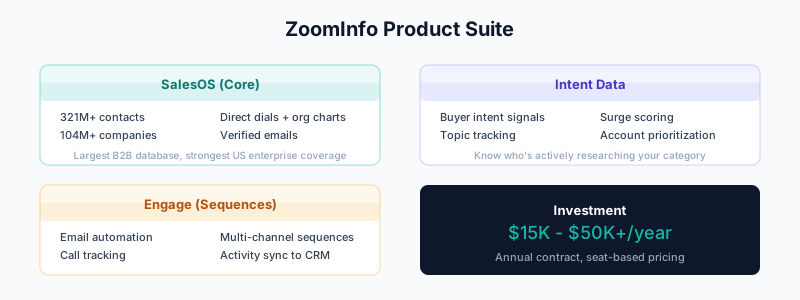
What ZoomInfo Offers
ZoomInfo provides several products under one platform:
SalesOS (Core Database):
- 321M+ professional contacts
- 104M+ companies
- Direct dial phone numbers
- Verified email addresses
- Org charts and reporting structures
Intent Data:
- Buyer intent signals
- Topic-based intent tracking
- Surge scoring
- Account prioritization
Engage (Sequences):
- Email automation
- Call tracking
- Multi-channel sequences
- Activity sync to CRM
Additional Products:
- OperationsOS (data orchestration)
- MarketingOS (ABM and advertising)
- TalentOS (recruiting)
ZoomInfo vs Other Tools
ZoomInfo vs Apollo
| Feature | ZoomInfo | Apollo |
|---|---|---|
| Database size | 321M+ contacts | 270M+ contacts |
| Data accuracy | 85-95% | 75-85% |
| Direct dials | Excellent | Good |
| Intent data | Built-in | Add-on |
| Pricing | $15K+ annually | $99-149/user/mo |
| Best for | Enterprise | SMB/Mid-market |
ZoomInfo vs Clay
| Feature | ZoomInfo | Clay |
|---|---|---|
| Data model | Single database | 100+ sources |
| Enrichment | One source | Waterfall |
| Flexibility | Out-of-box | Highly customizable |
| Intent | Built-in | Requires integration |
| Best for | Enterprise scale | Maximum coverage |
Many enterprise teams use both: ZoomInfo for core data + Clay for gaps and custom workflows.
Getting Started
Account Setup
-
Work with ZoomInfo sales for contract
-
Typical packages:
- Professional: Basic access, limited credits
- Advanced: Full database, intent data
- Elite: All features, premium support
-
Plan your implementation:
- User count and roles
- Integration requirements
- Data export needs
- Compliance requirements
Initial Configuration
Step 1: User Setup
- Go to Admin → User Management
- Create user accounts
- Assign roles:
- Admin (full access)
- Manager (team oversight)
- User (search and export)
- Configure SSO if applicable
Step 2: Credit Allocation
ZoomInfo uses credits for exports:
Credit Types:
- Contact exports (1 credit each)
- Company exports (varies)
- Bulk exports (discounted)

Credit Pools:
- Individual allocation per user
- Team shared pools
- Admin-controlled limits
Step 3: Search Configuration
Set default search parameters:
- Geographic focus
- Industry filters
- Company size ranges
- Seniority levels
CRM Integration
Salesforce Integration
ZoomInfo offers deep Salesforce integration:
Setup:
- Go to Admin → Integrations → Salesforce
- Click Connect
- Authorize via OAuth
- Configure sync settings
Sync Configuration:
Objects to Sync:
☑ Contacts
☑ Leads
☑ Accounts

Sync Direction:
☑ ZoomInfo → Salesforce (push)
☑ Salesforce → ZoomInfo (enrich)

Field Mapping:
  ZoomInfo Field    → Salesforce Field
  Email             → Email
  Direct Phone      → Phone
  Mobile Phone      → MobilePhone
  Job Title         → Title
  Company           → Company / Account
  LinkedIn URL      → Custom: LinkedIn_URL__c
  ZoomInfo ID       → Custom: ZoomInfo_ID__c

Enrichment Settings:
  - Auto-enrich new records: Yes
  - Auto-enrich on page view: Yes
  - Overwrite existing data: Configurable per field
Duplicate Handling:
ZoomInfo can create duplicates if not configured properly:
Recommended Settings:
  - Match on: Email (primary) + ZoomInfo ID
  - If match found: Update existing record
  - If no match: Create new (or flag for review)
  - Use Salesforce duplicate rules as backup
See Salesforce Duplicate Rules for prevention.
HubSpot Integration
Setup:
- Go to Admin → Integrations → HubSpot
- Click Connect
- Authorize via OAuth
- Configure sync settings
Configuration:
Objects to Sync:
☑ Contacts
☑ Companies

Sync Settings:
  - Push to HubSpot: Yes
  - Enrich HubSpot records: Yes
  - Create new records: Yes
  - Update existing: Yes

Field Mapping:
  ZoomInfo Field    → HubSpot Property
  Email             → email
  Phone             → phone
  Mobile            → mobilephone
  Title             → jobtitle
  Company           → company
For HubSpot deduplication, see HubSpot Duplicate Management.
Using ZoomInfo’s Database
Building Prospect Lists
Search Filters:
Example: Find VP-level sales leaders at enterprise SaaS

Person Filters:
  - Job Title Keywords: VP, Vice President, Head of
  - Job Function: Sales
  - Management Level: VP
  - Department: Sales, Revenue

Company Filters:
  - Industry: Computer Software, SaaS
  - Employee Count: 500-5000
  - Revenue: $50M-$500M
  - Technologies: Salesforce (indicates B2B)
  - Location: United States

Results: 2,847 contacts
Advanced Filters:
Intent Signals:
  - Topics: Sales Intelligence, Data Enrichment
  - Intent Score: High (7+)
  - Surge: Active in last 30 days

Org Chart:
  - Reports To: C-Suite
  - Direct Reports: 5+

Contact Quality:
  - Email Confidence: High
  - Phone Availability: Direct Dial
Saved Searches
Create saved searches for ongoing prospecting:
- Build your filter criteria
- Click Save Search
- Name it descriptively
- Set up alerts for new matches
- Configure auto-export (optional)
Chrome Extension
ZoomInfo’s Chrome extension works on:
- LinkedIn profiles
- Company websites
- Email clients
Features:
- One-click contact reveal
- Company insights
- Export directly to CRM
- Add to sequences
Intent Data
ZoomInfo’s intent data shows which companies are researching topics relevant to your solution.
Understanding Intent Signals
Intent Signal Components:
─────────────────────────────────────────────────
Topic: "CRM Data Quality"
Company: Acme Corporation
Intent Score: 8/10 (High)
Surge: Yes (+40% vs baseline)
Timeline: Last 14 days
Sources: 15+ research activities
Setting Up Intent
- Go to Intent → Topic Setup
- Select relevant topics (or create custom)
- Configure scoring thresholds
- Set up alerts
Recommended Topics by Use Case:
Data Enrichment Vendor:
  - CRM Data Quality
  - Sales Intelligence
  - Data Enrichment
  - B2B Data Providers
  - Lead Generation Tools

Sales Engagement Vendor:
  - Sales Automation
  - Email Outreach
  - Sales Cadence
  - Prospecting Tools
Intent-Based Workflows
Workflow: High-Intent Account Alert

Trigger: Intent Score ≥ 7 AND Surge = Yes

Actions:
1. Add to "Hot Accounts" list in ZoomInfo
2. Push to Salesforce (create/update Account)
3. Create Task for account owner
4. Send Slack notification to sales team
5. Add contacts to outreach sequence
Enrichment Workflows
Real-Time Enrichment
Salesforce Page View Enrichment:
- Rep views a Lead/Contact in Salesforce
- ZoomInfo checks for updates
- New data populated automatically
- No manual action required
Form Fill Enrichment:
- Lead fills out form (email only)
- ZoomInfo enriches via API/integration
- Full profile populated before routing
- Better lead scoring and assignment
Bulk Enrichment
For existing CRM data:
- Export from CRM (Leads, Contacts, or Accounts)
- Upload to ZoomInfo (or use integration)
- Match and enrich using email/company
- Review results before pushing back
- Sync to CRM with field mapping
Enrichment Coverage
ZoomInfo’s coverage is industry-leading but varies:
| Segment | Email Coverage | Phone Coverage |
|---|---|---|
| US Enterprise | 80-90% | 60-70% |
| US Mid-Market | 75-85% | 50-60% |
| US SMB | 60-70% | 40-50% |
| Europe | 60-75% | 35-50% |
| APAC | 45-60% | 25-40% |
Phone number strength is ZoomInfo’s differentiator—direct dials are significantly better than competitors.
For gaps in coverage:
- Use Clay waterfall enrichment
- Add Cognism for Europe
- Add Lusha for additional mobile numbers
Sequences (Engage)
If using ZoomInfo Engage for outbound:
Creating a Sequence
Example: Enterprise Outreach Sequence

Step 1: Email (Day 1)
  Subject: {first_name}, question about {company}'s data strategy
  Body: [Personalized opener referencing intent/research]

Step 2: Call (Day 2)
  Script: [Reference email, ask about challenges]
  If no answer: Leave voicemail

Step 3: LinkedIn (Day 3)
  Action: View profile + connection request

Step 4: Email (Day 5)
  Subject: Re: {company}'s data strategy
  Body: [Value-add content, case study link]

Step 5: Call (Day 7)
  Script: [Follow up on email content]

Step 6: Email (Day 10)
  Subject: Resource for {company}
  Body: [Relevant content offer]

Step 7: Call (Day 14)
  Final attempt before closing

Step 8: Email (Day 21)
  Subject: Should I close your file?
  Body: [Breakup email]
Sequence Best Practices
Email Limits:
- Start with 50-75 emails/day per inbox
- ZoomInfo monitors deliverability
- Adjust based on bounce and spam rates
Phone Integration:
- Connect to dialer (native or Dialpad/Aircall)
- Log all calls automatically
- Use local presence when available
Multi-Channel:
- Combine email + phone + LinkedIn
- ZoomInfo tracks all touchpoints
- Unified activity timeline
Measuring Success
Key Metrics
Prospecting:
- Contacts exported per week
- Match rate on enrichment
- Data accuracy (verified %)
- Credit efficiency
Engagement (if using Engage):
- Email deliverability (>95% target)
- Open rate (>40% target)
- Reply rate (>5% target)
- Meeting book rate (>1% target)
Pipeline:
- Opportunities from ZoomInfo-sourced leads
- Revenue attributed to ZoomInfo
- Cost per qualified lead
ROI Calculation
Example ROI Calculation:

Annual ZoomInfo Cost: $60,000
Monthly Activity:
  - Contacts exported: 5,000
  - Successful enrichments: 4,000 (80%)
  - Qualified leads: 400 (10%)
  - Meetings booked: 80 (20%)
  - Opportunities: 40 (50%)
  - Closed deals: 8 (20%)
  - Average deal size: $25,000

Annual Revenue from ZoomInfo: 8 × 12 × $25,000 = $2,400,000
ROI: 40x
ZoomInfo Analytics
Built-in dashboards track:
- Search and export activity
- Sequence performance
- Team productivity
- Intent signal trends
- Data accuracy scores
Common Issues
Issue: Low Match Rates
Symptoms: Enrichment returns <60% matches
Solutions:
- Ensure email domains are business (not personal)
- Check data formatting (clean before uploading)
- Try company domain matching for Account enrichment
- Use waterfall enrichment for gaps
Issue: CRM Sync Duplicates
Symptoms: Duplicate records appearing in Salesforce/HubSpot
Solutions:
- Configure ZoomInfo to match on email + ZoomInfo ID
- Enable “update existing” instead of “create new”
- Use CRM duplicate rules as safety net
- Run periodic deduplication (DemandTools)
Issue: Credit Burn Rate Too High
Symptoms: Running out of credits before renewal
Solutions:
- Review user export activity (identify heavy users)
- Implement export approval workflows
- Use saved searches instead of re-running queries
- Bulk export vs individual exports (better credit rates)
- Focus exports on high-value targets
Issue: Intent Data Not Actionable
Symptoms: Too many or too few intent signals
Solutions:
- Refine topic selection (be more specific)
- Adjust score thresholds (raise minimum)
- Combine intent with other filters (size, industry)
- Create workflows that auto-prioritize (don’t just alert)
Issue: Outdated Contact Data
Symptoms: Contacts have changed jobs, emails bounce
Solutions:
- Enable automatic re-enrichment
- Set up job change alerts
- Regularly refresh key accounts
- Cross-reference with Breeze Intelligence or other sources
Compliance and Data Privacy
GDPR Considerations
If targeting European contacts:
- ZoomInfo provides GDPR-compliant data
- Honor opt-out requests promptly
- Document legitimate interest basis
- Use suppression lists
CCPA Considerations
For California contacts:
- Respect do-not-sell requests
- Provide data deletion upon request
- Maintain consumer rights processes
Best Practices
Data Handling:
- Export only what you need
- Don't store ZoomInfo data outside approved systems
- Respect suppression lists
- Document consent where required
- Train users on compliance requirements
Related Guides
- Apollo Implementation Guide — Alternative for smaller budgets
- Clay 101 — Use with ZoomInfo for custom workflows
- Waterfall Enrichment Guide — Fill ZoomInfo’s gaps
- Salesforce Duplicate Rules — Prevent ZoomInfo duplicates
- Modern Outbound Data Stack — Where ZoomInfo fits
- The B2B Data Decay Problem — Why continuous enrichment matters