The Modern Outbound Data Stack: Clay + Instantly/Lemlist Architecture
How top sales teams structure their data enrichment and outbound infrastructure. Complete architecture guide with tool recommendations.
The outbound playbook has changed. The days of buying a ZoomInfo license and blasting emails are over.
Today’s best outbound teams run a modern data stack—a coordinated system of specialized tools that work together to find, enrich, and engage prospects at scale.
This guide breaks down exactly how to build one.
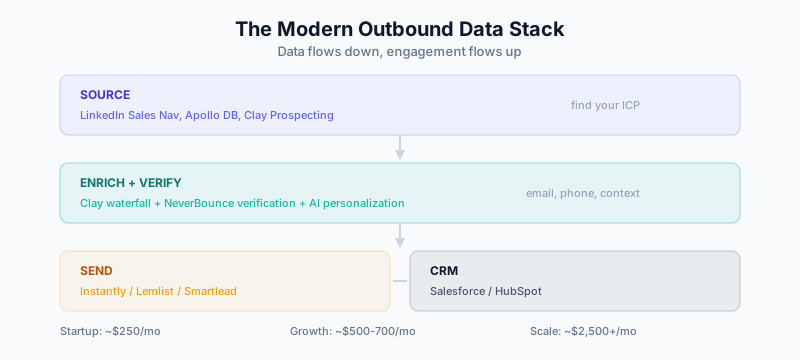
The Modern Outbound Stack Architecture
Here’s what the stack looks like:
┌─────────────────────────────────────────────────────────────────────┐
│                          DATA LAYER                                 │
├─────────────────────────────────────────────────────────────────────┤
│                                                                     │
│   ┌─────────────┐    ┌─────────────┐    ┌─────────────┐           │
│   │   SOURCE    │    │   ENRICH    │    │   VERIFY    │           │
│   │  LinkedIn   │ →  │    Clay     │ →  │ NeverBounce │           │
│   │  Apollo DB  │    │  Waterfall  │    │  ZeroBounce │           │
│   │  Sales Nav  │    │             │    │             │           │
│   └─────────────┘    └─────────────┘    └─────────────┘           │
│                                                                     │
└─────────────────────────────────────────────────────────────────────┘
                              │
                              ▼
┌─────────────────────────────────────────────────────────────────────┐
│                       ENGAGEMENT LAYER                              │
├─────────────────────────────────────────────────────────────────────┤
│                                                                     │
│   ┌─────────────┐    ┌─────────────┐    ┌─────────────┐           │
│   │   OUTREACH  │    │   WARMUP    │    │   INBOX     │           │
│   │  Instantly  │ ←  │  Instantly  │    │  Google/    │           │
│   │  Lemlist    │    │   Warmup    │    │  Outlook    │           │
│   │  Smartlead  │    │             │    │             │           │
│   └─────────────┘    └─────────────┘    └─────────────┘           │
│                                                                     │
└─────────────────────────────────────────────────────────────────────┘
                              │
                              ▼
┌─────────────────────────────────────────────────────────────────────┐
│                         CRM LAYER                                   │
├─────────────────────────────────────────────────────────────────────┤
│                                                                     │
│   ┌─────────────┐    ┌─────────────┐    ┌─────────────┐           │
│   │    CRM      │    │  PIPELINE   │    │  REPORTING  │           │
│   │ Salesforce  │    │   Stages    │    │ Attribution │           │
│   │  HubSpot    │    │             │    │             │           │
│   └─────────────┘    └─────────────┘    └─────────────┘           │
│                                                                     │
└─────────────────────────────────────────────────────────────────────┘
Let’s break down each layer.
Layer 1: Data Sourcing
Where to Find Prospects
You have several options for building target lists:
LinkedIn Sales Navigator
- Best for: Account-based targeting, saved searches
- Limitation: You can’t export directly; need a scraping tool
Apollo Database
- Best for: Quick list building with built-in filters
- Coverage: 270M+ contacts
- Cost: Free tier available, $99/mo for Pro
LinkedIn + Phantom Buster/Evaboot
- Best for: Scraping Sales Nav searches
- Note: Against LinkedIn ToS; use carefully
Clay Prospecting
- Best for: Building lists with immediate enrichment
- Integrates with: Crunchbase, G2, BuiltWith for trigger-based lists
The ICP-First Approach
Don’t start with a generic list. Define your ICP precisely:
Example ICP Definition:

Company:
- Industry: B2B SaaS
- Size: 50-500 employees
- Funding: Series A or later
- Tech stack: Uses Salesforce or HubSpot
- Geography: US and Canada

Contact:
- Title: VP/Director of Sales, RevOps, Sales Ops
- Reports to: CRO or CEO
- Likely challenges: Data quality, tool sprawl, manual processes
Then build lists that match this exactly.
Layer 2: Data Enrichment
This is where Clay shines.
The Enrichment Workflow
Raw Lead (Name + Company)
         │
         ▼
┌─────────────────────┐
│  COMPANY ENRICHMENT │
│  - Firmographics    │
│  - Technographics   │
│  - Funding data     │
│  - Employee count   │
└─────────────────────┘
         │
         ▼
┌─────────────────────┐
│  CONTACT ENRICHMENT │
│  - Work email       │
│  - Direct phone     │
│  - LinkedIn URL     │
│  - Title/seniority  │
└─────────────────────┘
         │
         ▼
┌─────────────────────┐
│  EMAIL VERIFICATION │
│  - Deliverability   │
│  - Catch-all check  │
│  - Risk scoring     │
└─────────────────────┘
         │
         ▼
┌─────────────────────┐
│  PERSONALIZATION    │
│  - AI first lines   │
│  - Company research │
│  - Recent triggers  │
└─────────────────────┘
         │
         ▼
    Enriched Lead
    Ready for Outreach
Building Your Clay Waterfall
Use waterfall enrichment to maximize coverage:
Email Waterfall:
- Apollo
- Hunter
- Dropcontact
- FindyMail
Phone Waterfall:
- Apollo
- Lusha
- Cognism
Verification:
- NeverBounce or ZeroBounce for email
- Only send to verified addresses
Personalization at Scale
Clay’s AI features let you generate personalization data:
For each prospect, Clay can:
1. Research their company's recent news
2. Check their LinkedIn for recent posts
3. Identify shared connections or interests
4. Generate a relevant first line

Output example:
"Saw {company} just raised Series B—congrats!
Scaling sales teams post-funding is where we help..."
This turns generic outreach into relevant conversations.
Layer 3: Email Infrastructure
The Deliverability Problem
Send too many cold emails from your main domain, and you’ll land in spam. The solution: a dedicated outbound infrastructure.
Email Sending Stack
Option 1: Instantly
- Pros: Built-in warmup, multi-inbox rotation, analytics
- Pricing: $97/mo for Growth
- Best for: Teams doing 1,000+ emails/day
Option 2: Lemlist
- Pros: Great personalization, images, LinkedIn steps
- Pricing: $59/mo per seat
- Best for: Personalized, multi-channel sequences
Option 3: Smartlead
- Pros: Unlimited email accounts, good deliverability
- Pricing: $94/mo
- Best for: High-volume senders
Domain & Inbox Setup
Don’t send from your main domain. Set up:
- Secondary domains: buy 2-5 similar domains (e.g., tryacme.com, getacme.io)
- Multiple inboxes: 3-5 inboxes per domain
- Warmup period: 2-3 weeks before sending at scale
- Volume limits: 30-50 emails per inbox per day max
Example setup:
Main domain: acme.com (marketing only)

Outbound domains:
- tryacme.com (3 inboxes × 40/day = 120/day)
- getacme.io (3 inboxes × 40/day = 120/day)
- acmehq.com (3 inboxes × 40/day = 120/day)

Total capacity: 360 personalized emails/day
Warmup Requirements
New inboxes need warmup:
| Week | Daily Send Limit | Warmup Emails |
|---|---|---|
| 1 | 5-10 | 30-50 warmup |
| 2 | 15-25 | 40-60 warmup |
| 3 | 30-40 | 30-50 warmup |
| 4+ | 40-50 | Maintenance |
Use built-in warmup (Instantly, Warmup Inbox) to automate this.
Layer 4: Sequence Design
The Modern Sequence
Forget 8-touch, pushy sequences. Here’s what works now:
Sequence Structure:
Day 1: Email 1 (value-first, personalized)
Day 3: Email 2 (follow-up, different angle)
Day 7: Email 3 (case study or social proof)
Day 14: Email 4 (breakup email)
Optional additions:
- LinkedIn connection request (Day 2)
- LinkedIn message (Day 5)
- Phone call (if direct dial available)
Email Copywriting Principles
Email 1: The Hook
Subject: {first_name}, quick question about {company}

{Personalized first line based on trigger/research}

{1-2 sentences on the problem you solve}

{Simple CTA: reply or quick call}

{Name}
Email 2: Different Angle
Subject: Re: {first_name}, quick question about {company}

Wanted to make sure this didn't get buried.

{New angle or additional value point}

{Same CTA}
Email 3: Social Proof
Subject: How {similar_company} solved {problem}

{Brief case study or result}

{Would this be relevant for {company}?}
Email 4: Breakup
Subject: Should I close your file?

Haven't heard back—should I assume the timing isn't right?

No worries if so. Just let me know either way.
Layer 5: CRM Integration
Syncing Data Back to CRM
Your enriched leads and engagement data should flow to your CRM:
What to sync:
- Enriched contact data (from Clay)
- Email engagement (opens, clicks, replies)
- Meeting bookings
- Deal stage updates
For Salesforce:
- Use Clay’s native Salesforce integration
- Create custom fields for enrichment data
- Set up automations for lead scoring
For HubSpot:
- Connect Clay to HubSpot
- Use workflows to route leads based on engagement
- Leverage Operations Hub for data quality
Lead Routing Logic
Replied positively → Sales rep follow-up
Clicked + no reply → LinkedIn touch
Bounced → Re-enrich email
No engagement → Pause and re-segment
Meeting booked → Create opportunity
Cost Breakdown
Here’s what a modern outbound stack costs:
Startup Stack (Low Budget)
| Tool | Cost/mo | Purpose |
|---|---|---|
| Apollo | $0-99 | Sourcing + basic enrichment |
| Hunter | $49 | Email finding |
| Instantly | $97 | Sending + warmup |
| Total | ~$245/mo |
Growth Stack (Recommended)
| Tool | Cost/mo | Purpose |
|---|---|---|
| Clay | $149-349 | Orchestration + enrichment |
| Apollo | $99 | Sourcing |
| NeverBounce | ~$50 | Verification |
| Instantly | $97 | Sending |
| Additional domains | $50 | Infrastructure |
| Total | ~$500-700/mo |
Scale Stack (High Volume)
| Tool | Cost/mo | Purpose |
|---|---|---|
| Clay | $800 | Heavy enrichment |
| ZoomInfo | $1,500+ | Premium data |
| Smartlead | $94 | High-volume sending |
| Multiple domains | $100 | Infrastructure |
| Total | ~$2,500+/mo |
Common Mistakes
Mistake 1: Sending Without Verification
Enrichment providers give you emails. They don’t guarantee deliverability. Verify every email before sending.
Mistake 2: Skipping Warmup
Sending from new inboxes without warmup destroys deliverability. Budget 2-3 weeks for warmup.
Mistake 3: Generic Personalization
“I saw you work at {company}” isn’t personalization. Use Clay’s AI to research actual triggers and talking points.
Mistake 4: Too Many Touches
8-12 touch sequences feel spammy. 4-5 well-crafted touches perform better.
Mistake 5: Ignoring Data Decay
Your enriched list decays at 70% per year. Re-enrich quarterly.
Implementation Timeline
Week 1: Foundation
- Set up secondary domains
- Purchase email inboxes
- Sign up for Clay and sending tool
- Start email warmup
Week 2: Data Pipeline
- Build ICP-matched list in Clay
- Set up waterfall enrichment
- Verify emails
- Add personalization columns
Week 3: Sequences
- Write email copy (4 emails)
- Set up sequence in outreach tool
- Configure CRM sync
- Create lead routing rules
Week 4: Launch
- Start sending (low volume)
- Monitor deliverability
- Iterate on copy based on responses
- Scale volume gradually
Measuring Success
Track these metrics:
| Metric | Target | Why It Matters |
|---|---|---|
| Deliverability rate | >95% | Are emails arriving? |
| Open rate | >50% | Is subject line working? |
| Reply rate | >5% | Is message resonating? |
| Positive reply rate | >2% | Are you booking meetings? |
| Meeting book rate | >1% | End goal |
Calculating ROI
Example:
- 1,000 enriched leads: $200 (Clay credits)
- Sending infrastructure: $150/mo
- 1% meeting rate: 10 meetings
- 30% meeting-to-opportunity: 3 opportunities
- Average deal size: $50,000
- Pipeline generated: $150,000
- Cost: $350
- ROI: 428x
When it works, outbound ROI is exceptional.
Related Guides
- Clay 101: Understanding Data Orchestration — Foundation for the data layer
- Waterfall Enrichment Guide — Maximize data coverage
- The B2B Data Decay Problem — Why continuous enrichment matters
- Data Enrichment vs Appending — Understanding different approaches
- Salesforce Duplicate Rules — Keep CRM clean as leads flow in
- HubSpot Operations Hub Guide — CRM data quality automation