The B2B Data Decay Problem: Why Your CRM Data Is Rotting
B2B data decays at 70% per year. Learn what causes data decay, how it impacts revenue, and strategies to combat it before it kills your pipeline.
Your CRM is lying to you.
That contact list you’re so proud of? By the end of the year, 70% of it will be wrong. Job titles will be outdated. Emails will bounce. Phone numbers will go to voicemail forever. Companies will have been acquired, renamed, or shut down entirely.
This is the B2B data decay problem, and it’s wrecking your sales and marketing without you noticing.
What Is B2B Data Decay?
Data decay (also called data degradation or data rot) is the gradual deterioration of data accuracy over time. In B2B contexts, this happens because the business world is constantly changing:
- People change jobs (the average tenure is now 4.1 years, down from 4.6 years in 2014)
- Companies restructure, merge, or get acquired
- Contact information changes (new email domains, phone systems, office locations)
- Technologies evolve (tech stacks change, tools get replaced)
The result? The data you captured six months ago is already significantly less accurate than when you collected it.
The Numbers: How Fast Does B2B Data Decay?
The numbers are worse than most people expect:
Annual Data Decay Rates
| Data Type | Annual Decay Rate | What This Means |
|---|---|---|
| Email addresses | 22-30% | 1 in 4 emails become invalid yearly |
| Phone numbers | 18-25% | Direct dials go stale quickly |
| Job titles | 30-40% | Promotions, lateral moves, departures |
| Company data | 20-25% | Mergers, acquisitions, rebrands |
| Overall contact records | 60-70% | Majority of records degrade annually |
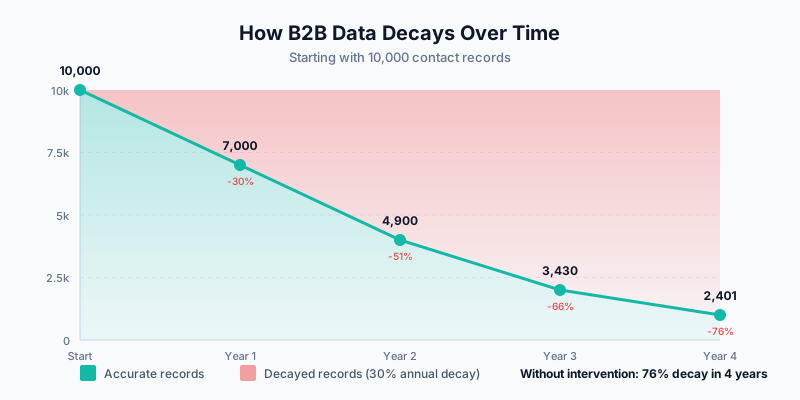
If you have a CRM with 10,000 contacts:
- After 1 year: ~3,000 contacts have degraded data
- After 2 years: ~5,000+ contacts are unreliable
- After 3 years: Your database is essentially unusable without intervention
The Root Causes of Data Decay
Here are the main drivers:

1. Job Mobility
People change jobs more often now. According to LinkedIn data:
- Gen Z (born 1997-2012): Changes jobs every 2.3 years on average
- Millennials (born 1981-1996): Changes jobs every 2.8 years
- Gen X (born 1965-1980): Changes jobs every 5.0 years
- Baby Boomers (born 1946-1964): Changes jobs every 8+ years
As younger workers become a larger share of B2B buyers, job changes are speeding up. When someone leaves a company:
- Their email stops working (or gets forwarded to a generic inbox)
- Their direct dial goes to someone else or voicemail
- Their decision-making authority transfers to a replacement
- Your relationship history becomes irrelevant
2. Organizational Changes
Companies are in constant flux:
- M&A activity: Thousands of acquisitions happen annually, often changing company names, domains, and org structures
- Restructuring: Departments get renamed, consolidated, or split
- Growth/contraction: Companies hire and fire, changing the validity of employee counts and revenue estimates
- Rebranding: Domain changes, name changes, and HQ relocations
3. Technology Evolution
B2B companies frequently change their tech stacks:
- Average SaaS churn: 30% of tools in a company’s stack change annually
- Technographic data decays as companies adopt new solutions
- Intent signals based on technology usage become outdated
4. Contact Behavior Changes
Even when people stay in the same role:
- They stop using certain communication channels
- They change their preferences (email vs. LinkedIn vs. phone)
- They become less responsive to certain types of outreach
The Business Impact of Data Decay
Poor data quality costs money. A lot of it.
Direct Costs
The Cost of Bad Data (IBM/Gartner Research)
- Companies lose an average of $12.9 million annually due to poor data quality
- Organizations believe 32% of their data is inaccurate
- Poor data quality costs the U.S. economy $3.1 trillion per year
- Bad data increases operational costs by 15-25%
Impact on Sales Teams
When sales reps work with decayed data:
- Wasted prospecting time: Reps spend 30%+ of their time researching and updating contact information instead of selling
- Bounced emails hurt deliverability: High bounce rates (>2%) can land your domain on spam blacklists
- Wrong-person calls: Reaching the wrong person damages credibility
- Missed decision-makers: Org chart changes mean targeting the wrong stakeholders
- Lost deals: Competitors with fresher data reach buyers first
Impact on Marketing Teams
For marketing, data decay manifests as:
- Lower email engagement: Invalid emails = lower open rates = worse deliverability
- Wasted ad spend: Targeting contacts who’ve left companies
- Inaccurate segmentation: Wrong titles, industries, or company sizes break personalization
- Compliance risk: GDPR/CCPA issues when processing stale data
- Skewed analytics: Decisions based on flawed data lead to poor strategy
The Compound Effect
Data decay compounds over time. As records become outdated:
- Lead scoring models become unreliable
- ICP matching accuracy decreases
- Attribution becomes impossible
- Forecasting becomes guesswork
Measuring Data Decay in Your CRM
Before you can fix data decay, you need to measure it. Here’s a framework for auditing your CRM:
Key Metrics to Track
1. Email Deliverability Rate
Valid Emails / Total Emails × 100

Target: >95%
Warning: <90%
Critical: <85%
2. Phone Connectivity Rate
Successful Connections / Total Dial Attempts × 100

Target: >30% (for verified direct dials)
Warning: <20%
Critical: <10%
3. Contact Freshness Score
Records Updated in Last 90 Days / Total Records × 100

Target: >60%
Warning: <40%
Critical: <20%
4. Bounce Rate Trend Track your email bounce rate month-over-month. Increasing bounce rates signal accelerating decay.
5. Data Completeness Score
Filled Required Fields / Total Required Fields × 100

Track: Email, Phone, Title, Company, Industry
Running a Data Quality Audit
Here’s a practical audit process:
Step 1: Export a sample (1,000-5,000 records)
Step 2: Verify email validity
- Use an email verification service (NeverBounce, ZeroBounce, Hunter)
- Categorize: Valid, Invalid, Catch-all, Unknown
Step 3: Check for job changes
- Cross-reference against LinkedIn (manually for a sample, or use enrichment tools)
- Flag contacts who’ve changed companies
Step 4: Validate company data
- Verify company is still operating
- Check for M&A activity
- Confirm firmographic data (size, industry, revenue)
Step 5: Calculate decay rate
Decayed Records / Total Records × (12 / Months Since Last Verification) = Annualized Decay RateStrategies to Combat Data Decay
So what can you do about it?
1. Implement Continuous Enrichment
The old model of “enrich once at capture” doesn’t work anymore. You need continuous enrichment—regularly refreshing your data from external sources.
How it works:
- Connect your CRM to enrichment providers (Clearbit, ZoomInfo, Apollo, etc.)
- Set up automated enrichment triggers:
- On new record creation
- On scheduled intervals (monthly/quarterly)
- On engagement (when a contact interacts with your content)
- Use waterfall enrichment (multiple providers in sequence) to maximize coverage
What to enrich:
- Email verification status
- Current job title and company
- Direct phone numbers
- Firmographic data
- Technographic data
2. Build Data Hygiene Workflows
Automate data cleaning processes within your CRM:
For Salesforce:
- Duplicate rules and matching rules to prevent duplicates
- Validation rules to enforce data quality at entry
- Flow-based automation to flag stale records
- Third-party tools (DemandTools, Cloudingo) for bulk cleaning
For HubSpot:
- Operations Hub data quality automation
- Workflow-based formatting and standardization
- Breeze Intelligence for native enrichment
- Third-party tools (Insycle, Koalify) for deduplication
3. Leverage Intent Signals
Intent data can help you prioritize which records to keep fresh:
- First-party intent: Website visits, content downloads, email engagement
- Third-party intent: Bombora, G2, TrustRadius signals
Focus your enrichment budget on high-intent accounts rather than trying to keep your entire database fresh.
4. Implement Data Governance
Establish policies and processes:
- Data ownership: Assign responsibility for data quality
- Entry standards: Define required fields and formats
- Update cadence: Set expectations for how often data should be refreshed
- Decay monitoring: Regular reporting on data quality metrics
5. Use Modern Orchestration Tools
Tools like Clay enable sophisticated enrichment workflows:
- Waterfall enrichment: Query multiple data sources in sequence
- Conditional logic: Only enrich records that meet certain criteria
- Cost optimization: Use cheaper sources first, premium sources as fallback
- CRM integration: Push refreshed data back to Salesforce/HubSpot automatically
The ROI of Fighting Data Decay
Investing in data quality pays off. Here’s what companies usually see:
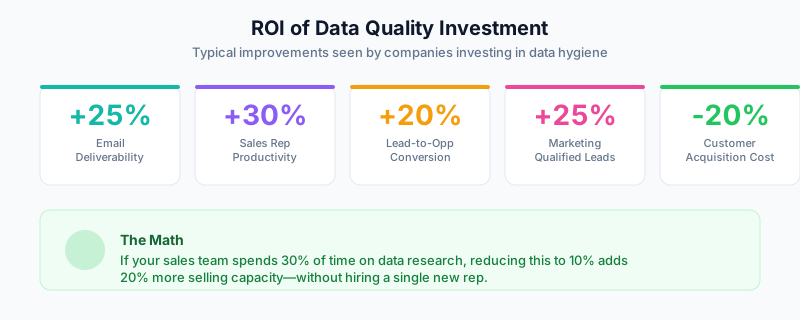
The math is simple: if your sales team spends 30% of their time researching and updating data, and you can reduce that to 10%, you’ve effectively added 20% more selling capacity without hiring.
Getting Started: A 30-Day Data Quality Sprint
If you’re ready to tackle data decay, here’s a practical 30-day plan:
Week 1: Assess
- Run a data quality audit on a representative sample
- Calculate your current decay rate
- Identify your highest-value segments
Week 2: Clean
- Bulk verify emails in your database
- Merge duplicates
- Standardize formatting (phone numbers, addresses, titles)
Week 3: Enrich
- Select enrichment providers based on your needs
- Set up enrichment for your highest-value segments
- Validate results against a control group
Week 4: Automate
- Implement ongoing enrichment workflows
- Set up data quality dashboards
- Establish governance policies
Data Decay Is Inevitable, But Manageable
You’ll never completely eliminate data decay. The business world changes too fast. But you can:
- Measure it — Know your decay rates by segment and data type
- Minimize it — Implement continuous enrichment and hygiene processes
- Prioritize it — Focus resources on your highest-value accounts
- Automate it — Build systems that maintain data quality without manual effort
The companies that win in B2B aren’t the ones with the most data—they’re the ones with the freshest data. When 70% of your database decays every year, keeping it clean becomes a real advantage.
Your CRM is either an asset or a liability. The difference is whether you’re actively fighting data decay or letting it slowly destroy your pipeline.