Data Enrichment vs Data Appending vs Data Enhancement: What's the Difference?
These terms are often used interchangeably, but they mean different things. Learn the distinctions and when to use each approach for your CRM data.
If you’ve spent any time researching CRM data quality, you’ve probably encountered three terms that seem to be used interchangeably: data enrichment, data appending, and data enhancement.
They’re related, but they’re not the same thing. Understanding the differences will help you choose the right approach—and the right vendors—for your specific needs.
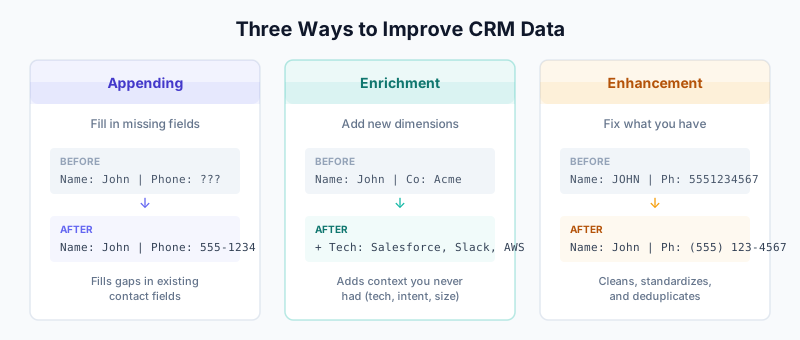
The Quick Answer
Here’s the simplest way to think about it:
| Term | What It Does | Example |
|---|---|---|
| Data Appending | Fills in missing fields | Adding a phone number to a contact that only has an email |
| Data Enrichment | Adds new, deeper information | Adding technographic data, intent signals, or social profiles |
| Data Enhancement | Improves existing data quality | Standardizing phone formats, correcting typos, validating emails |
Here’s what each one means in practice.
Data Appending: Filling the Gaps
Data appending is the process of adding missing data points to your existing records. It’s essentially gap-filling—you have a record with some information, and you want to complete it.
Common Appending Use Cases
- Adding email addresses to contacts that only have names and companies
- Adding phone numbers (especially direct dials) to contact records
- Adding mailing addresses for direct mail campaigns
- Adding company names to contacts where you only have an email domain
How Appending Works
- You provide your existing data (usually a list of names, emails, or companies)
- The appending service matches your records against their database
- Missing fields are populated based on matches
Appending Characteristics
- Quantitative focus: Appending typically deals with basic contact attributes—phone numbers, addresses, emails
- Match-dependent: Success depends on how well your records match the provider’s database
- Point-in-time: Appended data reflects what’s true at the moment of appending (and will decay over time)
When to Use Appending
- Your database has high incompleteness rates
- You need specific contact fields for outreach (phone, email)
- You’re preparing for a specific campaign that requires complete records
Data Enrichment: Adding Depth and Context
Data enrichment goes beyond filling gaps—it adds entirely new dimensions of information that weren’t part of your original data model.
Common Enrichment Use Cases
- Adding firmographic data: company size, revenue, industry, location
- Adding technographic data: what software/tools a company uses
- Adding intent data: signals showing buying interest
- Adding social data: LinkedIn profiles, Twitter handles
- Adding organizational data: reporting structures, department info
- Adding behavioral data: website visits, content engagement
How Enrichment Works
- You provide identifying information (email, company name, domain)
- The enrichment provider queries multiple data sources
- New data fields are added that weren’t in your original schema
Enrichment Characteristics
- Qualitative focus: Enrichment adds context and insight, not just contact details
- Multi-source: Good enrichment pulls from many data sources for accuracy
- Strategic value: Enriched data enables segmentation, scoring, and personalization
When to Use Enrichment
- You need to improve lead scoring accuracy
- You want to enable account-based marketing (ABM)
- You need technographic data for product-market fit analysis
- You’re building ICP-matched lead lists
Modern Enrichment: The Waterfall Approach
Today’s best practice is waterfall enrichment—querying multiple data providers in sequence to maximize coverage and accuracy. Tools like Clay make this easy by letting you chain together 50+ data sources.
Data Enhancement: Improving What You Have
Data enhancement focuses on improving the quality of data you already have, rather than adding new fields.
Common Enhancement Use Cases
- Standardization: Converting “VP of Sales”, “Vice President, Sales”, and “VP Sales” to a single format
- Validation: Verifying that email addresses are deliverable
- Correction: Fixing typos, outdated information, incorrect formatting
- Deduplication: Identifying and merging duplicate records
- Normalization: Ensuring consistent formats for phone numbers, addresses, dates
How Enhancement Works
- Your existing data is analyzed for quality issues
- Algorithms and/or human review identify problems
- Data is cleaned, standardized, and corrected
Enhancement Characteristics
- Quality-focused: The goal is accuracy and consistency, not new information
- Internal process: Enhancement can often be done with CRM-native tools
- Ongoing need: Enhancement should be continuous, not one-time
When to Use Enhancement
- Your data has formatting inconsistencies
- You have duplicate records creating confusion
- Email bounce rates are high
- Reports are unreliable due to data quality issues
Enhancement Tools by Platform
For Salesforce:
- DemandTools for bulk data manipulation
- Cloudingo for deduplication
- Native duplicate rules and matching rules
For HubSpot:
- Operations Hub data quality automation
- Insycle for bulk cleaning
- Native formatting workflows
Comparing the Three Approaches
Data Flow Visualization
┌─────────────────────────────────────────────────────────────────┐
│                     YOUR CRM DATABASE                           │
│                                                                 │
│  ┌─────────────┐    ┌─────────────┐    ┌─────────────┐        │
│  │   Contact   │    │   Contact   │    │   Contact   │        │
│  │  Record 1   │    │  Record 2   │    │  Record 3   │        │
│  │             │    │             │    │             │        │
│  │ Name: John  │    │ Name: Jane  │    │ Name: JOHN  │        │
│  │ Email: ✓    │    │ Email: ✓    │    │ Email: ✓    │        │
│  │ Phone: ✗    │    │ Phone: ✓    │    │ Phone: ✓    │        │
│  │ Company: ✓  │    │ Company: ✓  │    │ Company: ✓  │        │
│  └─────────────┘    └─────────────┘    └─────────────┘        │
└─────────────────────────────────────────────────────────────────┘
        │                    │                    │
        ▼                    ▼                    ▼
   ┌─────────┐         ┌──────────┐        ┌───────────┐
   │APPENDING│         │ENRICHMENT│        │ENHANCEMENT│
   │         │         │          │        │           │
   │Add phone│         │Add tech  │        │Fix "JOHN" │
   │number   │         │stack,    │        │to "John"  │
   │         │         │intent,   │        │           │
   │         │         │firmograph│        │Merge dupe │
   └─────────┘         └──────────┘        └───────────┘
Feature Comparison
| Aspect | Appending | Enrichment | Enhancement |
|---|---|---|---|
| Primary goal | Complete records | Add insights | Improve quality |
| Data direction | External → CRM | External → CRM | Internal processing |
| Typical fields | Email, phone, address | Technographics, intent, firmographics | Existing fields |
| Complexity | Low | Medium-High | Medium |
| Cost model | Per record/match | Per record or subscription | Tool subscription |
| Frequency | Periodic | Continuous or triggered | Continuous |
Cost Comparison
Appending is typically the cheapest option—you’re paying for basic contact data.
Enrichment costs more because you’re accessing premium data sources (intent data, technographics).
Enhancement cost depends on your approach:
- Native CRM tools: Often free or included
- Third-party tools: $100-500+/month
- Manual processes: High labor cost
Building a Complete Data Strategy
In practice, you need all three approaches working together:
The Ideal Data Flow
New Lead Enters CRM
        │
        ▼
┌───────────────────┐
│   ENHANCEMENT     │  ← Standardize formats on entry
│   (Real-time)     │  ← Validate email immediately
└───────────────────┘
        │
        ▼
┌───────────────────┐
│   APPENDING       │  ← Fill missing phone/email
│   (On creation)   │
└───────────────────┘
        │
        ▼
┌───────────────────┐
│   ENRICHMENT      │  ← Add firmographics, tech stack
│   (On creation +  │  ← Add intent signals
│    scheduled)     │
└───────────────────┘
        │
        ▼
┌───────────────────┐
│   ONGOING         │  ← Re-enrich quarterly
│   MAINTENANCE     │  ← Re-validate emails monthly
│                   │  ← Dedupe weekly
└───────────────────┘
Recommended Stack
-
Enhancement layer (always on)
- HubSpot Operations Hub or Salesforce automation
- Deduplication tools running continuously
-
Appending layer (on record creation)
- Basic contact data providers
- Email verification services
-
Enrichment layer (strategic)
- Clay for waterfall enrichment
- Or direct integrations with ZoomInfo, Clearbit, Apollo, etc.
Common Mistakes to Avoid
Mistake 1: Treating Enrichment as One-Time
Data decays at 70% per year. A one-time enrichment project provides temporary value. Build continuous enrichment processes instead.
Mistake 2: Enriching Before Enhancing
Don’t pay to enrich dirty data. Clean and deduplicate first, then enrich—otherwise you’ll enrich duplicate records and waste money.
Mistake 3: Ignoring Match Rates
Appending and enrichment depend on matching your records to provider databases. If your data is too incomplete or inaccurate, match rates will be low. Enhance first.
Mistake 4: Over-Enriching Low-Value Records
Not every record deserves full enrichment. Prioritize:
- High-intent accounts
- ICP-fit companies
- Active opportunities
Use basic appending for everything else.
Vendor Categories
Appending-Focused Vendors
- Experian
- Acxiom
- InfoUSA/Data.com
Enrichment-Focused Vendors
- ZoomInfo (contact + company + intent)
- Clearbit/Breeze Intelligence (firmographics + technographics)
- Apollo (contact + company)
- 6sense (intent)
- Bombora (intent)
Enhancement-Focused Tools
- DemandTools (Salesforce)
- Cloudingo (Salesforce)
- Insycle (HubSpot + Salesforce)
- DataGroomr (Salesforce)
Multi-Purpose Platforms
- Clay (enrichment orchestration)
- Openprise (enterprise data orchestration)
Quick Decision Framework
Use Appending when:
- You need specific contact fields (email, phone) for outreach
- Your records are incomplete but you know who you’re targeting
- You’re on a tight budget and need basics
Use Enrichment when:
- You need to qualify and score leads
- You’re doing account-based marketing
- You need technographic or intent data
- You want to personalize at scale
Use Enhancement when:
- Your data has quality issues (formatting, duplicates)
- Reports are unreliable
- Email deliverability is suffering
- You’re preparing data for enrichment
Related Guides
- The B2B Data Decay Problem — Why your CRM data degrades over time
- Clay 101: Understanding Data Orchestration — Modern approach to multi-source enrichment
- Waterfall Enrichment Guide — How to chain multiple data providers
- HubSpot Operations Hub Data Quality — Native enhancement tools
- Salesforce Duplicate Rules Guide — Preventing duplicates at the source