Clay 101: Understanding the Data Orchestration Model
Clay isn't a database—it's a data orchestration platform. Learn the mental model, core concepts, and how Clay differs from traditional enrichment tools.
If you’ve been researching data enrichment tools, you’ve probably come across Clay. But here’s the thing: Clay isn’t really an enrichment tool—at least not in the traditional sense.
Clay is a data orchestration platform. This distinction matters for using it well.
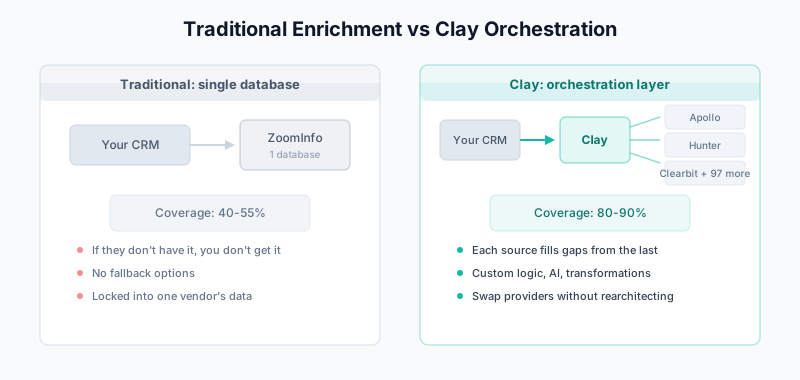
The Traditional Enrichment Model
Traditional enrichment tools like ZoomInfo, Clearbit, or Apollo work like this:
- You give them a contact or company
- They look it up in their database
- They return whatever data they have
Your CRM → Enrichment Tool → Their Database → Data Back to YouThe limitation? You’re dependent on a single data source. If ZoomInfo doesn’t have a phone number for someone, you don’t get a phone number.
The Clay Model: Orchestration, Not Storage
Clay works differently. Clay doesn’t maintain its own database. Instead, it:
- Connects to 100+ external data providers
- Lets you query them in any order or combination
- Applies logic, transformations, and AI along the way
- Pushes results wherever you need them
Your Data → Clay (Orchestration Layer) → Multiple Data Sources → Transformed Data → Your CRMThink of Clay as Zapier meets a spreadsheet, purpose-built for data operations.
Core Concepts
Tables
Everything in Clay starts with a table. A table is like a spreadsheet where:
- Each row is a record (person, company, etc.)
- Each column is a data point or enrichment
You can:
- Import data from your CRM, CSV, or other sources
- Build tables from scratch using Clay’s prospecting tools
- Connect tables to each other
Enrichments
Enrichments are Clay’s core building blocks. An enrichment is a column that fetches data from an external source.
Clay offers 100+ enrichment integrations, including:
- Contact data: Apollo, Lusha, RocketReach, Hunter, Dropcontact
- Company data: Clearbit, ZoomInfo, Crunchbase, PeopleDataLabs
- Email finding: Hunter, Snov.io, FindyMail, Prospeo
- Email verification: NeverBounce, ZeroBounce, MillionVerifier
- Technographics: BuiltWith, Wappalyzer, HG Insights
- Social: LinkedIn, Twitter, GitHub
Waterfall Enrichment
This is Clay’s killer feature. Instead of relying on one data source, you can chain multiple sources in sequence:
Try Apollo for email
    ↓ (if no result)
Try Hunter
    ↓ (if no result)
Try Dropcontact
    ↓ (if no result)
Try FindyMail
The first source to return valid data wins. This increases your coverage significantly while keeping costs down.
Learn more in our complete waterfall enrichment guide.
Formulas
Clay has a powerful formula system (similar to Excel/Sheets) that lets you:
- Transform data (clean names, parse domains)
- Apply conditional logic
- Combine fields
- Create scoring models
Example formulas:
// Extract domain from email
DOMAIN(email)

// Clean and capitalize name
PROPER(TRIM(first_name))

// Conditional scoring
IF(employee_count > 100, "Enterprise", "SMB")
AI Columns (Claygent)
Clay’s AI features let you:
- Research companies using AI agents that browse the web
- Write personalized outreach copy
- Extract structured data from unstructured text
- Classify and categorize records
This is where Clay gets interesting—you can ask it to “find the VP of Sales at this company” and it will actually go research it.
Mental Model: The Data Assembly Line
Think of Clay as an assembly line for data:
┌─────────────────────────────────────────────────────────────────┐
│                         CLAY TABLE                              │
├─────────────────────────────────────────────────────────────────┤
│                                                                 │
│  ┌─────┐    ┌─────┐    ┌─────┐    ┌─────┐    ┌─────┐          │
│  │Input│ → │Enrich│ → │Enrich│ → │Filter│ → │Output│          │
│  │Data │    │Step 1│    │Step 2│    │Logic │    │to CRM│       │
│  └─────┘    └─────┘    └─────┘    └─────┘    └─────┘          │
│                                                                 │
│  Company    Find CEO    Get CEO    Score &   Push to           │
│  List       Contact     Email      Qualify   Salesforce        │
│                                                                 │
└─────────────────────────────────────────────────────────────────┘
Each column in your table is a step in the assembly line. Data flows left to right, getting enriched and transformed at each stage.
What Makes Clay Different
vs. ZoomInfo/Apollo/Clearbit
| Aspect | Traditional Tools | Clay |
|---|---|---|
| Data source | Single database | 100+ sources |
| Enrichment logic | Fixed | Customizable waterfalls |
| AI capabilities | Limited | Extensive (Claygent) |
| Transformations | Basic | Full formula system |
| Pricing model | Per-seat or per-record | Credit-based |
When to use traditional tools: You need a reliable, simple solution and one data source is sufficient.
When to use Clay: You need maximum coverage, custom logic, or complex workflows.
vs. Zapier/Make
Clay is purpose-built for data operations. While Zapier can connect apps, Clay offers:
- Native enrichment integrations (not just API connectors)
- Spreadsheet-like interface for data manipulation
- Waterfall logic built-in
- AI agents for research
vs. Building Your Own
You could build Clay’s functionality with APIs and code. But Clay handles:
- Authentication with 100+ providers
- Rate limiting and retries
- Credit optimization
- A visual interface for non-engineers
Common Use Cases
1. Lead List Building
Start with a target account list, then:
- Find contacts at each company (Apollo, LinkedIn)
- Get verified emails (waterfall: Hunter → Dropcontact → FindyMail)
- Verify emails (NeverBounce)
- Enrich with company data (Clearbit)
- Push qualified leads to CRM
2. CRM Enrichment
Connect Clay to your CRM, then:
- Pull records missing key fields
- Enrich with multiple sources
- Apply data quality rules
- Push enriched data back
This is especially powerful for combating data decay.
3. Account Research at Scale
For each target account:
- Use Claygent to research recent news, funding, hiring
- Find relevant stakeholders
- Identify technology stack
- Generate personalized talking points
4. Outbound Personalization
Build modern outbound data stacks:
- Build ICP-matched lists
- Enrich with personalization data points
- Generate custom first lines with AI
- Push to outreach tools (Instantly, Lemlist, Smartlead)
Getting Started with Clay
Step 1: Start with a Simple Table
Don’t try to build complex workflows on day one. Start with:
- Import 50-100 records from a CSV
- Add one enrichment (like “Find email with Hunter”)
- See how it works
Step 2: Understand Credits
Clay uses a credit system:
- Different enrichments cost different amounts
- Waterfall enrichments only charge when data is found
- AI features (Claygent) use more credits
Start with their free tier to learn the system.
Step 3: Build a Waterfall
Once you understand basics, build your first waterfall enrichment:
- Add a primary email enrichment
- Add a fallback source
- Add a third fallback
- Compare coverage to single-source
Step 4: Connect to Your CRM
Clay integrates with:
- Salesforce
- HubSpot
- Pipedrive
- And others via Zapier/webhooks
Set up bi-directional sync:
- Pull records needing enrichment
- Push enriched data back
Clay Limitations
Clay isn’t perfect for every use case:
Learning Curve
Clay is powerful but complex. Expect 2-4 weeks to become proficient.
No Outreach Built-In
Clay enriches data but doesn’t send emails. You’ll need a separate outreach tool (Instantly, Lemlist, Outreach, etc.).
Credit Management
Complex workflows can burn through credits quickly. Monitor usage carefully.
Best for Batch Operations
Clay excels at batch processing. For real-time, single-record enrichment on form submission, native CRM integrations (like Breeze Intelligence) may be simpler.
Clay vs. Native CRM Enrichment
Should you use Clay or your CRM’s built-in enrichment?
Use native enrichment (Breeze, Salesforce Data Cloud) when:
- You need real-time enrichment on lead creation
- One data source provides sufficient coverage
- You want zero integration complexity
Use Clay when:
- You need data from multiple sources
- You’re building prospecting lists from scratch
- You need custom logic and transformations
- You want AI-powered research capabilities
Many teams use both: native enrichment for real-time basics, Clay for deep enrichment and list building.
Pricing Overview
Clay offers several tiers:
| Plan | Price | Credits | Best For |
|---|---|---|---|
| Free | $0 | 100/month | Learning |
| Starter | $149/month | 2,000 | Small teams |
| Explorer | $349/month | 10,000 | Growing teams |
| Pro | $800/month | 50,000 | Scaling operations |
| Enterprise | Custom | Custom | Large organizations |
Credits don’t expire monthly—unused credits roll over (with limits).
Next Steps
Now that you understand Clay’s mental model:
- Sign up for free and experiment with a small dataset
- Read our waterfall enrichment guide to maximize coverage
- Explore the modern outbound stack to see how Clay fits into a complete workflow
- Connect to your CRM and start enriching real data
Related Guides
- Waterfall Enrichment in Clay: Complete Guide — Maximize data coverage with multi-source enrichment
- The Modern Outbound Data Stack — How Clay fits into outbound workflows
- The B2B Data Decay Problem — Why continuous enrichment matters
- Data Enrichment vs Appending — Understanding different data improvement approaches
- Breeze Intelligence Guide — HubSpot’s native enrichment alternative