HubSpot Breeze Intelligence: Complete Guide to Native Enrichment
Master HubSpot Breeze Intelligence (formerly Clearbit). Learn setup, credit optimization, and when to use native vs third-party enrichment.
HubSpot acquired Clearbit in 2024 and integrated it as Breeze Intelligence—native data enrichment built directly into HubSpot.
This guide covers everything you need to know: what gets enriched, how credits work, and when to use Breeze vs other tools.
What Is Breeze Intelligence?
Breeze Intelligence automatically enriches contact and company records with data from Clearbit’s database of 400M+ contacts and 50M+ companies.
What it enriches:
Contact data:
- Job title and seniority
- LinkedIn profile
- Location
- Employment history
Company data:
- Industry
- Employee count
- Annual revenue
- Tech stack
- Funding information
- Company description
- Social profiles
Key benefits:
- Native HubSpot integration (no external tools)
- Automatic enrichment on record creation
- Continuous refresh (monthly updates)
- Form shortening capability
Breeze vs Legacy Clearbit
If you used Clearbit before the HubSpot acquisition:
| Feature | Clearbit (Legacy) | Breeze Intelligence |
|---|---|---|
| Interface | Separate platform | Built into HubSpot |
| Billing | Separate | HubSpot subscription |
| API access | Direct API | Through HubSpot |
| Enrichment timing | Real-time or batch | Automatic + on-demand |
| Data coverage | Same | Same (Clearbit data) |
The underlying data is the same—Breeze is Clearbit repackaged for HubSpot.
How Breeze Intelligence Works
Automatic Enrichment
When enabled, Breeze automatically enriches:
- New contacts: Enriched immediately upon creation
- Existing contacts: Enriched based on your settings
- Companies: Enriched when contacts are associated
Trigger conditions:
- Contact/company has an email domain
- Record hasn’t been enriched recently
- You have available credits
Continuous Enrichment
Breeze doesn’t just enrich once—it refreshes data:
- 30-day refresh cycle: Records are re-enriched monthly
- No additional credits: Continuous refresh doesn’t consume credits
- Change detection: Only updates when data has changed
This helps combat data decay automatically.
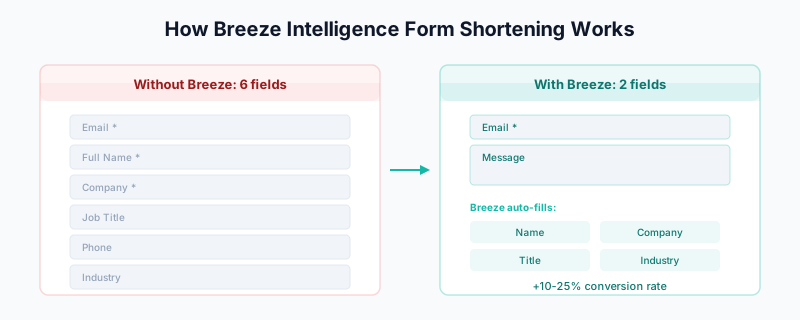
Form Shortening
One of Breeze’s most valuable features: reduce form fields while capturing more data.
How it works:
- Visitor enters email on form
- Breeze enriches behind the scenes
- Form auto-populates known fields
- Visitor only fills in what’s unknown
Example:
Without Breeze:
  Form fields: Email, Name, Company, Title, Phone, Industry
  User fills: 6 fields

With Breeze:
  Form fields: Email, Message
  User fills: 2 fields
  Breeze adds: Name, Company, Title, Industry (from enrichment)
Result: Higher conversion rates + complete data.
Setting Up Breeze Intelligence
Step 1: Check Your Subscription
Breeze Intelligence requires:
- HubSpot Marketing Hub or Sales Hub Professional+
- Purchased Breeze Intelligence credits
Check: Settings → Account & Billing → Products
Step 2: Enable Enrichment
- Go to Settings → Data Management → Data Enrichment
- Turn on Automatic enrichment
- Configure settings:
- Which objects to enrich (Contacts, Companies)
- Credit allocation preferences
- Enrichment priority
Step 3: Configure Properties
Choose which properties Breeze should populate:
Recommended contact properties:
- Job title
- Seniority level
- LinkedIn URL
- Employment role
- Location
Recommended company properties:
- Industry
- Employee count range
- Annual revenue range
- Company type
- Description
- Tech stack
Step 4: Set Up Form Shortening (Optional)
- Go to Marketing → Forms
- Edit or create a form
- Enable Progressive profiling
- Configure field visibility rules
Understanding Credits
Breeze uses a credit system. Understanding it matters for cost management.
How Credits Work
- 1 credit = 1 successful enrichment
- Credits are consumed only when data is found
- Failed lookups don’t consume credits
- Continuous refresh doesn’t consume additional credits
Credit Tiers
Breeze Intelligence is sold in credit tiers:
| Tier | Monthly Credits | Best For |
|---|---|---|
| Starter | 1,000 | Small teams |
| Growth | 5,000 | Growing companies |
| Scale | 25,000 | High-volume operations |
| Enterprise | Custom | Large organizations |
Credits reset monthly (don’t roll over).
Credit Optimization
Strategy 1: Prioritize high-value records
Don’t enrich everything. Focus on:
- Records with business email domains (skip gmail.com, etc.)
- Records matching your ICP
- Active opportunities
In HubSpot, use workflows to control enrichment:
Trigger: Contact created
Condition: Email domain is NOT in [gmail.com, yahoo.com, hotmail.com]
Action: Enrich with Breeze
Strategy 2: Time your enrichment
Enrich at the right moment:
- Form submissions → Immediate (for lead routing)
- List imports → Batch overnight
- Existing database → Gradual over time
Strategy 3: Monitor usage
Check credit consumption:
- Settings → Data Enrichment → Usage
- Set up alerts for high consumption
- Review ROI monthly
What Consumes Credits vs What’s Free
Uses credits:
- Initial enrichment of a new record
- On-demand enrichment requests
Free (no credits):
- Continuous refresh of already-enriched records
- Lookups that return no data
- Form shortening (uses existing enrichment)
Data Coverage and Accuracy
Coverage Rates
Breeze/Clearbit coverage varies by segment:
| Segment | Email Coverage | Company Coverage |
|---|---|---|
| Tech/SaaS (US) | 60-75% | 80-90% |
| Enterprise (US) | 55-70% | 75-85% |
| SMB (US) | 40-55% | 60-70% |
| Europe | 45-60% | 65-80% |
| APAC | 30-45% | 50-65% |
Key factors affecting coverage:
- Company size (larger = better coverage)
- Industry (tech > traditional)
- Geography (US > international)
- Recency (newer data = better)
Accuracy Considerations
Clearbit data is generally accurate, but:
- Job titles change: People get promoted, change roles
- Company data shifts: Funding rounds, headcount changes
- Contact info decays: 70% annual decay rate
Breeze’s continuous refresh helps, but it’s not real-time.
When Breeze Returns No Data
If enrichment fails, consider:
- Email domain issues: Personal emails (gmail) don’t enrich well
- Small companies: Less coverage for tiny businesses
- International contacts: Lower coverage outside US/EU
- New companies: Recently founded companies may not be in database
For gaps, consider waterfall enrichment with Clay.
Breeze vs Third-Party Enrichment
When to Use Breeze Alone
Breeze is sufficient when:
- Your ICP is US-based tech/enterprise
- You need basic firmographics and contact data
- You want zero integration complexity
- Coverage rates meet your needs
- You’re not doing high-volume outbound
When to Add Third-Party Tools
Consider Clay or others when:
- Single-source coverage is insufficient
- You need phone numbers (Breeze focuses on email)
- You need intent data
- You’re building prospecting lists from scratch
- You need data from specific regions (EU, APAC)
Hybrid Approach (Recommended)
Many teams use both:
Real-time enrichment (form fills, lead creation):
  → Breeze Intelligence (native, fast)

Batch enrichment (list building, deep enrichment):
  → Clay with waterfall (maximum coverage)

Re-enrichment (combat decay):
  → Breeze continuous refresh + quarterly Clay updates
Integrating Breeze with Workflows
Workflow 1: Enrich and Route New Leads
Trigger: Form submission

Actions:
1. Wait: 30 seconds (for enrichment to complete)
2. Branch: If Company Size > 100 employees
   → Assign to Enterprise sales rep
3. Branch: If Company Size <= 100
   → Assign to SMB sales rep
4. Send: Internal notification with enriched data
Workflow 2: Prioritize Based on Enrichment
Trigger: Contact enriched by Breeze

Actions:
1. Branch: If Seniority = "Executive" AND Company Revenue > $10M
   → Set Lead Score = High
   → Add to "Priority Leads" list
2. Branch: If Seniority = "Manager" AND Company Revenue > $1M
   → Set Lead Score = Medium
3. Default:
   → Set Lead Score = Standard
Workflow 3: Handle Enrichment Failures
Trigger: Contact created
Condition: After 24 hours, Company is still blank

Actions:
1. Add to "Needs Manual Research" list
2. Notify sales rep
3. Or: Trigger Clay enrichment via webhook
Workflow 4: Combine with Data Quality Automation
Trigger: Contact created

Actions:
1. Format: Lowercase email
2. Format: Capitalize name
3. Check: Breeze enrichment
4. Calculate: Data quality score
5. Deduplicate: Insycle check
6. Route: Based on enriched data
Measuring Enrichment ROI
Key Metrics
1. Enrichment Rate
Successfully Enriched Records / Total Records × 100
Target: >60% for US tech contacts
2. Data Completeness
Average fields populated after enrichment
Track: Before vs after enabling Breeze
3. Form Conversion Impact
Conversion rate with short forms (Breeze) vs long forms
Typical lift: 10-25% improvement
4. Sales Efficiency
Time saved on manual research
Research time before Breeze - Research time after
5. Credit Efficiency
Qualified leads generated / Credits consumed
Track monthly to optimize spend
ROI Calculation
Example calculation:

Monthly Breeze cost: $500 (5,000 credits)
Credits used: 4,000
Successful enrichments: 3,200 (80% hit rate)
Qualified leads from enriched data: 320 (10% qualification rate)
Deals closed from qualified leads: 16 (5% close rate)
Average deal size: $5,000

Revenue from Breeze-enriched leads: 16 × $5,000 = $80,000
Breeze cost: $500
ROI: 159x
Troubleshooting
Issue: Low Enrichment Rate
Causes:
- Too many personal emails (gmail, yahoo)
- International contacts outside coverage areas
- Small/new companies not in database
Solutions:
- Filter enrichment to business domains only
- Use Clay waterfall for gaps
- Focus credits on ICP-matching records
Issue: Enrichment Not Triggering
Check:
- Is Breeze enabled in settings?
- Do you have available credits?
- Is the contact/company in scope?
- Is the email domain valid?
Issue: Wrong Data Returned
Causes:
- Common names matching wrong person
- Company domain shared (consultants using client domains)
- Outdated data in Clearbit database
Solutions:
- Report data issues to HubSpot support
- Add manual verification for high-value leads
- Cross-reference with LinkedIn
Issue: Credits Depleting Too Fast
Solutions:
- Restrict enrichment to priority segments
- Skip personal email domains
- Review which objects are being enriched
- Set up budget alerts
Related Guides
- HubSpot Operations Hub Data Quality — Combine enrichment with data quality
- HubSpot Duplicate Management — Prevent duplicate enrichment
- Clay 101 — For gaps Breeze doesn’t cover
- Waterfall Enrichment Guide — Multi-source enrichment
- The B2B Data Decay Problem — Why continuous enrichment matters
- Data Enrichment vs Appending — Understanding different approaches