HubSpot Operations Hub Data Quality Automation: Complete Guide
Master HubSpot Operations Hub data quality features. Learn to automate formatting, standardization, and data cleaning with workflows.
HubSpot Operations Hub introduced data quality automation—the ability to automatically clean, format, and standardize your CRM data using workflows.
No more manually fixing capitalization, phone formats, or date inconsistencies. Set it up once, and HubSpot handles it forever.
This guide covers every data quality feature in Operations Hub.
What Is Operations Hub?
Operations Hub is HubSpot’s toolkit for RevOps teams. It includes:
- Data Sync: Connect apps and sync data bi-directionally
- Data Quality Automation: Auto-format and clean data (this guide)
- Programmable Automation: Custom code in workflows
- Datasets: Custom reporting data models
Pricing tiers:
- Starter ($20/mo): Basic data sync
- Professional ($800/mo): Data quality automation, programmable automation
- Enterprise ($2,000/mo): Advanced features, datasets
Data quality automation requires Professional or Enterprise.
Data Quality Command Center
Before automating fixes, understand your current data quality.
Accessing the Command Center
- Go to Data Management → Data Quality
- You’ll see an overview of data issues
What It Shows
Property Insights:
- Properties with formatting issues
- Properties with missing values
- Properties with duplicate values
Issue Categories:
- Capitalization problems
- Whitespace issues
- Date format inconsistencies
- Phone format issues
Taking Action
From the Command Center, you can:
- See records with specific issues
- Fix issues in bulk
- Set up automation rules (workflows)
Data Quality Automation Actions
Operations Hub adds special workflow actions for data formatting.
Available Actions
| Action | What It Does |
|---|---|
| Format data: Capitalize | Fixes capitalization (names, titles) |
| Format data: Lowercase | Converts to lowercase (emails) |
| Format data: Uppercase | Converts to uppercase |
| Format data: Trim whitespace | Removes leading/trailing spaces |
| Format data: Fix date | Standardizes date formats |
| Format data: Fix phone | Standardizes phone number formats |
| Format data: Replace character | Find and replace text |
| Format data: Set property | Conditional value setting |
Accessing Format Data Actions
- Go to Automation → Workflows
- Create or edit a workflow
- Add an action
- Search for “Format data”
- Select the formatting type
Setting Up Data Quality Workflows
Workflow 1: Contact Name Formatting
Ensure first and last names are properly capitalized.
Trigger:
Contact is created
OR
Contact property "First name" is updated
Actions:
1. Format data: Capitalize first letter
   Property: First name
   Result: "JOHN" → "John", "john" → "John"

2. Format data: Capitalize first letter
   Property: Last name
   Result: "SMITH" → "Smith", "smith" → "Smith"

3. Format data: Trim whitespace
   Property: First name
   Result: " John " → "John"

4. Format data: Trim whitespace
   Property: Last name
Edge cases to consider:
- Names like “McDonald” or “O’Brien” may need manual review
- Multi-part names (van der Berg) need special handling
- Single-letter names (J.) shouldn’t be changed
Workflow 2: Email Standardization
Ensure emails are lowercase and trimmed.
Trigger:
Contact is created
OR
Contact property "Email" is updated
Actions:
1. Format data: Lowercase
   Property: Email
   Result: "John@Acme.COM" → "john@acme.com"

2. Format data: Trim whitespace
   Property: Email
   Result: " john@acme.com " → "john@acme.com"
Workflow 3: Phone Number Formatting
Standardize phone numbers to a consistent format.
Trigger:
Contact is created
OR
Contact property "Phone number" is updated
Actions:
1. Format data: Format phone number
   Property: Phone number
   Format: National (e.g., (555) 123-4567)
   OR
   Format: E.164 (e.g., +15551234567)
Format options:
- National: (555) 123-4567
- International: +1 555-123-4567
- E.164: +15551234567 (best for APIs and integrations)
Workflow 4: Company Name Cleanup
Fix common company name issues.
Trigger:
Company is created
OR
Company property "Name" is updated
Actions:
1. Format data: Trim whitespace
   Property: Company name

2. Format data: Replace character
   Property: Company name
   Find: "  " (double space)
   Replace: " " (single space)

3. Format data: Replace character
   Property: Company name
   Find: "Inc." or "Inc" or "Incorporated"
   Replace: "Inc." (standardize)
Workflow 5: Date Standardization
Ensure dates are in a consistent format.
Trigger:
Contact property "Custom date field" is updatedActions:
1. Format data: Format date property
   Property: Custom date field
   Output format: YYYY-MM-DD
Programmable Automation (Custom Code)
For complex data quality rules, use custom code actions.
Enabling Custom Code
Custom code actions require Operations Hub Professional or Enterprise.
Supported languages:
- JavaScript (Node.js)
- Python
Example 1: Advanced Name Parsing
// Parse full name into first and last
exports.main = async (event, callback) => {
  const fullName = event.inputFields['fullname'];

  if (!fullName) {
    callback({ outputFields: {} });
    return;
  }

  const parts = fullName.trim().split(' ');
  const firstName = parts[0];
  const lastName = parts.slice(1).join(' ');

  callback({
    outputFields: {
      firstname: firstName,
      lastname: lastName
    }
  });
};
Example 2: Domain Extraction
// Extract domain from email
exports.main = async (event, callback) => {
  const email = event.inputFields['email'];

  if (!email || !email.includes('@')) {
    callback({ outputFields: { domain: '' } });
    return;
  }

  const domain = email.split('@')[1].toLowerCase();

  callback({
    outputFields: {
      domain: domain
    }
  });
};
Example 3: Data Validation
// Validate and score data quality
exports.main = async (event, callback) => {
  const email = event.inputFields['email'];
  const phone = event.inputFields['phone'];
  const company = event.inputFields['company'];

  let score = 0;
  let issues = [];

  // Check email
  if (email && email.includes('@')) {
    score += 30;
  } else {
    issues.push('Missing or invalid email');
  }

  // Check phone
  if (phone && phone.length >= 10) {
    score += 30;
  } else {
    issues.push('Missing or invalid phone');
  }

  // Check company
  if (company && company.length > 1) {
    score += 40;
  } else {
    issues.push('Missing company');
  }

  callback({
    outputFields: {
      data_quality_score: score,
      data_quality_issues: issues.join('; ')
    }
  });
};
Example 4: External API Call
// Verify email using external service
const axios = require('axios');

exports.main = async (event, callback) => {
  const email = event.inputFields['email'];

  try {
    const response = await axios.get(
      `https://api.emailverifier.com/verify?email=${email}`,
      { headers: { 'Authorization': 'Bearer YOUR_API_KEY' } }
    );

    callback({
      outputFields: {
        email_verified: response.data.valid,
        email_verification_date: new Date().toISOString()
      }
    });
  } catch (error) {
    callback({
      outputFields: {
        email_verified: false,
        email_verification_error: error.message
      }
    });
  }
};
Building a Complete Data Quality System
Combine individual workflows into a comprehensive system.
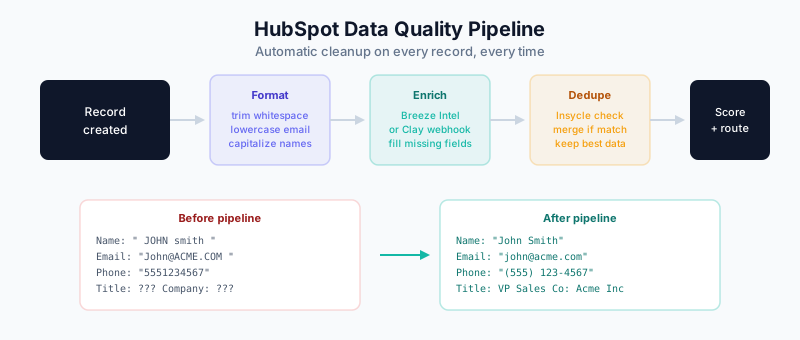
The Data Quality Pipeline
Record Created/Updated
         │
         ▼
┌─────────────────────┐
│  IMMEDIATE CLEANUP  │
│  - Trim whitespace  │
│  - Lowercase email  │
│  - Basic formatting │
└─────────────────────┘
         │
         ▼
┌─────────────────────┐
│  ENRICHMENT CHECK   │
│  - Breeze Intel     │
│  - Or Clay trigger  │
└─────────────────────┘
         │
         ▼
┌─────────────────────┐
│ DUPLICATE CHECK     │
│  - Insycle/Koalify  │
│  - Merge if needed  │
└─────────────────────┘
         │
         ▼
┌─────────────────────┐
│  QUALITY SCORING    │
│  - Calculate score  │
│  - Flag low quality │
└─────────────────────┘
         │
         ▼
┌─────────────────────┐
│  ROUTING/ALERTING   │
│  - Route to sales   │
│  - Alert on issues  │
└─────────────────────┘
Master Workflow: New Contact Processing
Workflow Name: Contact - Data Quality Pipeline
Trigger: Contact is created

Actions:
1. Format data: Trim whitespace (First name)
2. Format data: Trim whitespace (Last name)
3. Format data: Trim whitespace (Email)
4. Format data: Capitalize first letter (First name)
5. Format data: Capitalize first letter (Last name)
6. Format data: Lowercase (Email)
7. Format data: Format phone number (Phone)
8. Custom code: Calculate data quality score
9. Branch: If score < 50
   → Send internal notification
   → Set property "Needs data review" = Yes
10. Insycle: Check for duplicates
11. Branch: If duplicate found
    → Merge records
12. Breeze Intelligence: Enrich contact
13. Set property: Data processed date = Today
14. Continue to next workflow (routing, etc.)
Scheduled Maintenance Workflow
Workflow Name: Weekly Data Quality Maintenance
Trigger: Scheduled - Every Sunday at 2 AM

Enrollment: Contacts where
  - Data quality score < 70
  - AND last modified > 30 days ago

Actions:
1. Re-run formatting workflows
2. Re-calculate quality score
3. Branch: If still low quality
   → Add to "Data Cleanup" list
   → Notify data admin
Integration with Enrichment
Data quality and enrichment work together:
Breeze Intelligence Integration
Breeze Intelligence (HubSpot’s native enrichment) can be part of your data quality workflow:
1. Clean data first (formatting, deduplication)
2. Enrich cleaned records
3. Re-score quality after enrichment
Clay Integration
For advanced enrichment, trigger Clay workflows:
HubSpot Workflow:
1. When: Contact created with email
2. Action: Webhook to Clay
3. Clay: Run enrichment waterfall
4. Clay: Push enriched data back to HubSpot
5. HubSpot: Continue workflow
Monitoring and Reporting
Data Quality Dashboard
Create a dashboard with these reports:
1. Quality Score Distribution
- Chart: Pie or bar
- Metric: Count of contacts by quality score range
- Segments: 0-25, 26-50, 51-75, 76-100
2. Issues by Type
- Chart: Bar
- Metric: Count of contacts with each issue type
- Breakdown: Missing email, missing phone, invalid format, etc.
3. Quality Trend Over Time
- Chart: Line
- Metric: Average quality score by month
- Goal: Trending upward
4. New Records Quality
- Chart: Line
- Metric: Average quality score of records created this month
- Benchmark: Compare to overall average
Automated Reports
Set up scheduled reports:
Report: Weekly Data Quality Summary
Recipients: RevOps team
Schedule: Every Monday 9 AM

Contents:
- New duplicates found: [count]
- Records cleaned: [count]
- Average quality score: [score]
- Top issues: [list]
Troubleshooting
Issue: Workflow Not Triggering
Check:
- Is the trigger condition correct?
- Is the contact enrolled in other workflows that might conflict?
- Is the workflow active?
Issue: Formatting Not Working
Check:
- Is the property value null/empty?
- Is the property type correct (text vs number)?
- Are there special characters causing issues?
Issue: Custom Code Errors
Debug steps:
- Check execution logs in workflow history
- Test code locally first
- Add try/catch blocks for error handling
- Log intermediate values
Issue: Performance/Timeouts
Solutions:
- Break large workflows into smaller ones
- Use scheduled workflows for bulk operations
- Limit enrollment criteria
Best Practices
1. Start Simple
Don’t build complex workflows immediately. Start with:
- Whitespace trimming
- Email lowercase
- Basic capitalization
Add complexity gradually.
2. Test Before Activating
Always test workflows with sample records before full activation:
- Create a test contact
- Run the workflow manually
- Verify results
- Then activate
3. Document Your Rules
Maintain documentation of:
- What each workflow does
- Why formatting decisions were made
- Edge cases and exceptions
4. Monitor Continuously
Set up alerts for:
- Workflow errors
- Unusual data quality drops
- Enrollment spikes
5. Iterate Based on Data
Review data quality reports monthly:
- What issues are most common?
- Are workflows catching them?
- What new rules are needed?
Related Guides
- HubSpot Duplicate Management Guide — Deduplication workflows
- Breeze Intelligence Guide — Native enrichment integration
- The B2B Data Decay Problem — Why data quality matters
- Clay 101 — Advanced enrichment workflows
- Data Enrichment vs Appending — Understanding data improvement approaches
- Salesforce Duplicate Rules — If syncing with Salesforce