HubSpot Duplicate Management: Complete Guide
Master HubSpot's duplicate management tools. Learn to use the native duplicate manager, set up workflow-based deduplication, and integrate third-party tools.
Duplicate records in HubSpot cause chaos: marketing sends multiple emails to the same person, sales reps work the same lead unknowingly, and your reports become meaningless.
HubSpot offers native duplicate management tools, but they have limitations. This guide covers both native capabilities and how to extend them.
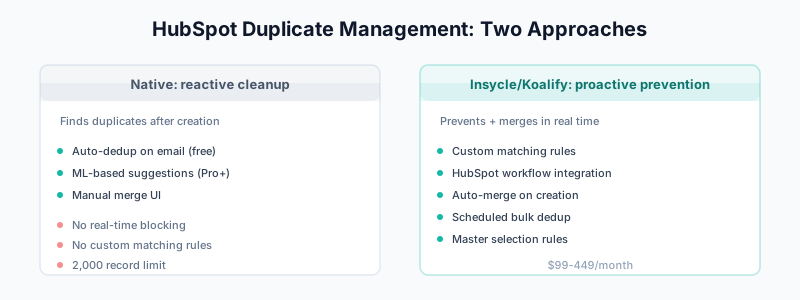
How HubSpot Handles Duplicates
Automatic Email-Based Deduplication
HubSpot automatically deduplicates contacts based on email address:
- When you create a contact with an email that already exists, HubSpot updates the existing record instead of creating a duplicate
- This happens automatically—no configuration needed
Important limitation: This only works when the email field is populated. Contacts without emails can duplicate freely.
The Duplicate Management Tool
HubSpot Pro and Enterprise subscriptions include a duplicate management tool that identifies potential duplicates using machine learning.
What it detects:
- Contacts with similar names and companies
- Companies with similar names
- Records the ML model believes are likely duplicates
What it doesn’t do:
- Automatically merge duplicates
- Prevent duplicates in real-time
- Work with custom objects (in all cases)
Using HubSpot’s Native Duplicate Manager
Accessing the Tool
- Navigate to Contacts → Contacts (or Companies)
- Click Actions → Manage duplicates
- You’ll see a list of potential duplicate pairs
Reviewing Duplicates
For each pair, HubSpot shows:
- The two records side by side
- A confidence score
- Which fields differ
Merging Duplicates
- Select which record should be the “primary” (winner)
- Review which values to keep from each record
- Click Merge
The secondary record is deleted, and:
- All associations transfer to the primary
- Activity history is combined
- Form submissions are preserved
Bulk Actions
With Data Hub Professional or Enterprise, you can:
- Select multiple duplicate pairs
- Merge in bulk
- Set rules for which record wins
Limitations of Native Duplicate Management
HubSpot’s native tools have significant gaps:
Limitation 1: Reactive, Not Preventive
The duplicate manager finds duplicates after they’re created. It doesn’t prevent them.
Limitation 2: No Real-Time Blocking
Unlike Salesforce duplicate rules, HubSpot can’t block a duplicate at the point of creation (without custom development).
Limitation 3: Limited Matching Criteria
The ML model decides what’s a duplicate. You can’t define custom matching rules (e.g., “match on phone number”).
Limitation 4: 2,000 Record Limit
HubSpot only shows the most recent 2,000 identified duplicates. If you have more, you can’t see or manage them all.
Limitation 5: No Workflow Integration
Native HubSpot workflows can’t compare two records or trigger merges. You need third-party tools for automation.
Workflow-Based Deduplication with Third-Party Tools
To overcome these limitations, integrate HubSpot with deduplication tools that offer workflow actions.
Option 1: Insycle
Insycle is the most popular HubSpot deduplication tool.
Key Features:
- Custom matching rules (any field combination)
- Workflow integration (merge duplicates as part of a workflow)
- Scheduled automated deduplication
- Bulk operations
- Preview before merge
Workflow Integration:
Trigger: Contact form submitted
Action 1: Insycle - Find and merge duplicates
Action 2: Continue with onboarding sequence
This merges duplicates before your welcome email goes out.
Pricing: Based on connected records ($149-449/month typical)
Option 2: Koalify
Koalify offers HubSpot-native deduplication with a focus on simplicity.
Key Features:
- Duplicate detection on any property
- Workflow actions for auto-merge
- CRM card showing duplicates
- Bulk merge capabilities
Workflow Integration:
Trigger: Contact created
Condition: Koalify identifies duplicate
Action: Auto-merge to existing record
Pricing: Starts at $99/month
Option 3: Dedupely
Dedupely provides real-time duplicate detection.
Key Features:
- Real-time duplicate alerts
- Custom matching fields
- Merge automation
- Native + custom objects
Pricing: Based on usage
Setting Up Insycle for HubSpot Deduplication
Here’s a step-by-step guide for the most common setup:
Step 1: Connect Insycle to HubSpot
- Sign up for Insycle
- Connect your HubSpot account (OAuth)
- Wait for initial data sync
Step 2: Create a Matching Template
- Go to Merge Duplicates → Create Template
- Select object (Contacts, Companies, or Deals)
- Define matching criteria:
Example: Contact Matching Template

Match Group 1:
  - Email (Exact match)

OR

Match Group 2:
  - First Name (Similar)
  - Last Name (Similar)
  - Company Name (Similar)
Step 3: Preview Matches
- Run the template in Preview mode
- Review identified duplicates
- Adjust matching criteria if too loose or strict
Step 4: Set Master Selection Rules
Define which record “wins” when merging:
Master Selection Rules:
1. Record with most recent activity
2. Record with most populated fields
3. Record created first (if tie)
Step 5: Enable Automation
For ongoing deduplication:
- Scheduled runs: Set template to run daily/weekly
- Workflow integration: Add Insycle action to HubSpot workflows
- Real-time: Enable immediate deduplication on record creation
Step 6: Monitor Results
Insycle provides reports on:
- Duplicates found and merged
- Fields affected
- Time saved
Review monthly to ensure rules are working correctly.
Preventing Duplicates at the Source
Beyond merging, prevent duplicates from being created:
Strategy 1: Form Pre-Population
Use Breeze Intelligence or progressive profiling to recognize returning visitors:
Visitor arrives → HubSpot recognizes cookie → Pre-fills form
                                            → Updates existing record
                                              (no duplicate created)
Strategy 2: API Deduplication
If records come via API, check for duplicates before creating:
// Pseudo-code for API integration
async function createOrUpdateContact(contactData) {
  // Search for existing contact by email
  const existing = await hubspot.search({
    filterGroups: [{
      filters: [{
        propertyName: 'email',
        operator: 'EQ',
        value: contactData.email
      }]
    }]
  });

  if (existing.results.length > 0) {
    // Update existing
    await hubspot.update(existing.results[0].id, contactData);
  } else {
    // Create new
    await hubspot.create(contactData);
  }
}
Strategy 3: Import Deduplication
When importing data:
- Pre-clean your file: Use Excel or Google Sheets to remove duplicates before import
- Use HubSpot’s import settings: Enable “Update existing contacts” based on email
- Run Insycle post-import: Clean up any duplicates that slip through
Strategy 4: Integration Settings
For integrations (Salesforce, etc.):
- Review sync settings for duplicate handling
- Map unique identifiers correctly
- Test with sample data before full sync
Cross-Object Duplicate Considerations
Contacts at Multiple Companies
A person can legitimately exist at multiple companies. HubSpot handles this through associations, not duplicates:
John Smith ← Contact record (one)
    │
    ├── Associated to: Acme Corp (past employer)
    └── Associated to: NewCo Inc (current employer)
Don’t merge these—update associations instead.
Leads vs Contacts
Unlike Salesforce, HubSpot doesn’t have separate Lead and Contact objects. All people are Contacts. This reduces (but doesn’t eliminate) duplicate risk.
Company Hierarchies
Parent/child company relationships aren’t duplicates:
Alphabet Inc (Parent)
    ├── Google LLC (Child)
    └── Waymo LLC (Child)
Use HubSpot’s parent company associations, not merges.
Data Quality Workflows
Combine deduplication with broader data quality automation:
Workflow 1: New Contact Cleanup
Trigger: Contact created

Actions:
1. Format: Capitalize first name
2. Format: Capitalize last name
3. Format: Lowercase email
4. Insycle: Check and merge duplicates
5. Enrich: Breeze Intelligence
6. Route: Assign to sales rep
Workflow 2: Scheduled Data Hygiene
Trigger: Scheduled (weekly)

Actions:
1. Insycle: Run deduplication template
2. Insycle: Standardize phone formats
3. Insycle: Fix state abbreviations
4. Send: Report to data admin
Workflow 3: Pre-Sales Handoff
Trigger: Lifecycle stage = Sales Qualified Lead

Actions:
1. Insycle: Verify no duplicates
2. Condition: If duplicate found → Alert sales ops
3. Condition: If no duplicate → Continue to assignment
Measuring Deduplication Success
Track these metrics:
Duplicate Rate
(Duplicates found / Total records) × 100

Baseline: Run initial audit
Target: <1% of new records become duplicates
Merge Volume
Track: Duplicates merged per week/month
Trend: Should decrease over time as prevention improves
Data Quality Score
Create a HubSpot calculated property or report:
Score components:
- Has email: +20 points
- Has phone: +20 points
- Has company: +20 points
- Not a duplicate: +20 points
- Recently updated: +20 points

Total: 100 points possible
Target average: >80
Time Savings
Estimate hours saved:
Manual duplicate review: ~2 min per duplicate
Automated: ~0 min per duplicate

Monthly duplicates: 500
Time saved: 500 × 2 min = 16.6 hours/month
Troubleshooting
Issue: Too Many False Positives
Problem: Insycle/Koalify flags records that aren’t duplicates.
Solution:
- Tighten matching criteria (add more required fields)
- Use exact match instead of fuzzy
- Add exclusion rules for known edge cases
Issue: Duplicates Still Appearing
Problem: New duplicates created despite automation.
Check:
- Is the workflow trigger correct?
- Are API integrations respecting deduplication?
- Is import deduplication enabled?
Issue: Merge Losing Data
Problem: Important field values lost during merge.
Solution:
- Review master selection rules
- Consider “keep all values” for multi-value fields
- Use preview mode before bulk operations
Issue: Performance Impact
Problem: Deduplication slowing down workflows.
Solution:
- Run heavy deduplication off-hours (scheduled)
- Use async processing where available
- Limit real-time dedup to critical paths
Related Guides
- HubSpot Operations Hub Data Quality Guide — Complete data quality automation
- Breeze Intelligence Guide — Native enrichment that prevents duplicates
- Salesforce Duplicate Rules — If you’re syncing with Salesforce
- The B2B Data Decay Problem — Why data quality matters
- Data Enrichment vs Appending — Understanding data improvement approaches