Building a Salesforce Data Quality Scorecard
Create a comprehensive data quality scorecard for Salesforce. Learn how to measure, track, and improve CRM data quality with actionable metrics.
You can’t improve what you don’t measure. A data quality scorecard transforms vague concerns about “bad data” into specific, trackable metrics that drive action.
This guide shows you how to build a scorecard that identifies problems, tracks progress, and proves ROI on data quality initiatives.
Why You Need a Data Quality Scorecard
Without measurement, data quality conversations go like this:
Sales: "The data is bad."
Marketing: "What do you mean by bad?"
Sales: "It's just... not good."
Operations: "We cleaned it last quarter."
Sales: "It's still bad."
A scorecard changes the conversation:
"Our Account completeness score dropped from 78% to 71% last month.
The main driver is missing Industry on 2,400 new Accounts.
We need to enable mandatory Industry capture at creation."
Specific. Actionable. Trackable.
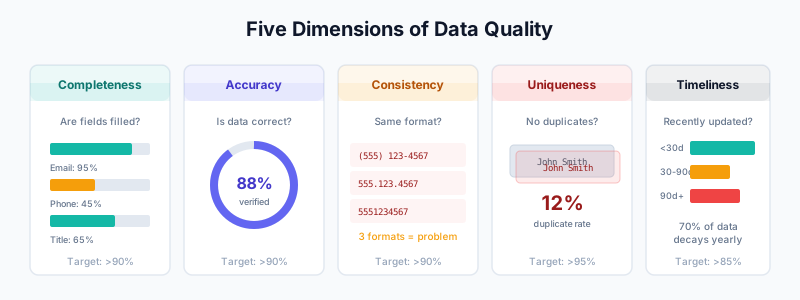
Data Quality Dimensions
Score your data across five dimensions:
1. Completeness
Do records have all required fields populated?
Completeness Score = (Populated Required Fields / Total Required Fields) × 100

Example:
Required Contact Fields: Email, First Name, Last Name, Account, Title
Contact has: Email ✓, First Name ✓, Last Name ✓, Account ✓, Title ✗

Completeness = 4/5 = 80%
2. Accuracy
Is the data correct and current?
Accuracy Score = (Verified Records / Total Records) × 100

Verification methods:
- Email deliverability (not bounced)
- Phone connectivity (not disconnected)
- Job title recency (updated within 6 months)
3. Consistency
Is data formatted uniformly across records?
Consistency Score = (Standardized Records / Total Records) × 100

Examples of inconsistency:
- Phone: "(555) 123-4567" vs "555.123.4567" vs "5551234567"
- State: "California" vs "CA" vs "Cal"
- Title: "VP Sales" vs "Vice President of Sales" vs "VP, Sales"
4. Uniqueness
Are records free from duplicates?
Uniqueness Score = (Unique Records / Total Records) × 100

Example:
Total Contacts: 10,000
Duplicate groups found: 500 (1,200 duplicate records)
Unique records: 8,800

Uniqueness = 8,800 / 10,000 = 88%
5. Timeliness
How recently was the data updated?
Timeliness Score = (Records Updated in Threshold / Total Records) × 100

Threshold examples:
- Contacts: Updated within 90 days
- Opportunities: Updated within 7 days
- Accounts: Updated within 180 days
Building Your Scorecard
Step 1: Define Critical Fields
Identify the fields that matter most for each object.
Contacts:
Required (Weight: High):
- Email
- First Name
- Last Name
- Account

Important (Weight: Medium):
- Title
- Phone
- Mailing Address

Optional (Weight: Low):
- LinkedIn URL
- Department
Accounts:
Required (Weight: High):
- Account Name
- Website
- Type (Customer, Prospect, etc.)

Important (Weight: Medium):
- Industry
- Employee Count
- Annual Revenue
- Billing Address

Optional (Weight: Low):
- Description
- Parent Account
Leads:
Required (Weight: High):
- Email
- First Name
- Last Name
- Company

Important (Weight: Medium):
- Phone
- Lead Source
- Title

Optional (Weight: Low):
- Website
- Address
Step 2: Set Benchmarks
Establish targets for each dimension:
| Dimension | Poor | Fair | Good | Excellent |
|---|---|---|---|---|
| Completeness | <60% | 60-75% | 75-90% | >90% |
| Accuracy | <70% | 70-80% | 80-90% | >90% |
| Consistency | <60% | 60-75% | 75-90% | >90% |
| Uniqueness | <85% | 85-90% | 90-95% | >95% |
| Timeliness | <50% | 50-70% | 70-85% | >85% |
Step 3: Create Measurement Reports
Report 1: Completeness by Object
Report Type: Contacts
Fields: Total Records, Records with Email, Records with Title, etc.

Grouping: By Account Type (Customer vs Prospect)

Formula Fields:
- Email_Complete__c = IF(Email != null, 1, 0)
- Title_Complete__c = IF(Title != null, 1, 0)
- Overall_Completeness__c = (Email_Complete__c + Title_Complete__c + ...) / Total_Fields
Report 2: Duplicate Detection
Use duplicate rules reports or DemandTools analysis.
Export duplicate job results:
- Total records scanned
- Duplicate groups found
- Records in duplicate state
- Merge candidates
Report 3: Data Freshness
Report Type: Contacts
Filter: Last Modified Date < TODAY - 90

Columns:
- Record Count
- Owner
- Account Type

Grouping: By Last Modified Date (bucket by month)
Step 4: Build the Dashboard
Create a Salesforce dashboard with these components:
Component 1: Overall Score (Gauge)
Single aggregate showing weighted average of all dimensions
Target zones: Red (<70%), Yellow (70-85%), Green (>85%)
Component 2: Dimension Breakdown (Bar Chart)
Horizontal bars showing each dimension's score
Color-coded against benchmarks
Component 3: Trend Over Time (Line Chart)
Monthly scores for past 12 months
Shows improvement or degradation
Component 4: Problem Areas (Table)
Top 10 fields with lowest completion rates
Sorted by impact (volume × importance)
Component 5: Segment Comparison (Stacked Bar)
Compare scores: Customers vs Prospects vs Partners
Identify where to focus efforts
Automated Scoring with Flow
Create Flows to calculate scores automatically.
Contact Data Quality Score Flow
Flow: Calculate Contact Data Quality Score
Trigger: Contact is created or updated

Variables:
- completenessScore (Number)
- totalFields (Number) = 8
- populatedFields (Number) = 0

Steps:

1. Assignment: Count Populated Fields
   If Email != null → populatedFields + 1
   If FirstName != null → populatedFields + 1
   If LastName != null → populatedFields + 1
   If AccountId != null → populatedFields + 1
   If Title != null → populatedFields + 1
   If Phone != null → populatedFields + 1
   If MailingCity != null → populatedFields + 1
   If LinkedIn_URL__c != null → populatedFields + 1

2. Formula: Calculate Score
   completenessScore = (populatedFields / totalFields) × 100

3. Update Records
   Contact.Data_Quality_Score__c = completenessScore
   Contact.Last_Quality_Check__c = NOW()
Account Data Quality Score Flow
Flow: Calculate Account Data Quality Score
Trigger: Account is created or updated

Weighted Scoring:
- Account Name: 15 points (required)
- Website: 15 points (required)
- Industry: 12 points
- Type: 12 points
- Employee Count: 10 points
- Annual Revenue: 10 points
- Billing Address: 10 points
- Phone: 8 points
- Description: 8 points

Max Score: 100 points
Apex for Complex Scoring
For more sophisticated scoring logic:
public class DataQualityScorer {

    public static Decimal calculateContactScore(Contact c) {
        Decimal score = 0;
        Decimal maxScore = 100;

        // Required fields (40 points total)
        if (String.isNotBlank(c.Email)) score += 15;
        if (String.isNotBlank(c.FirstName)) score += 10;
        if (String.isNotBlank(c.LastName)) score += 10;
        if (c.AccountId != null) score += 5;

        // Important fields (40 points total)
        if (String.isNotBlank(c.Title)) score += 15;
        if (String.isNotBlank(c.Phone)) score += 10;
        if (String.isNotBlank(c.MailingCity)) score += 10;
        if (String.isNotBlank(c.MailingState)) score += 5;

        // Optional fields (20 points total)
        if (String.isNotBlank(c.LinkedIn_URL__c)) score += 10;
        if (String.isNotBlank(c.Department)) score += 5;
        if (String.isNotBlank(c.MobilePhone)) score += 5;

        // Accuracy penalties
        if (c.Email_Bounced__c == true) score -= 20;
        if (c.Phone_Disconnected__c == true) score -= 10;

        // Recency bonus
        if (c.LastModifiedDate > Date.today().addDays(-90)) score += 5;

        return Math.max(0, Math.min(score, maxScore));
    }

    public static void scoreContacts(List<Contact> contacts) {
        for (Contact c : contacts) {
            c.Data_Quality_Score__c = calculateContactScore(c);
        }
    }
}
Segment-Specific Scoring
Different records may need different scoring criteria.
Customer vs Prospect Scoring
Customer Contacts (Higher Standard):
  Required: Email, Phone, Title, LinkedIn
  Target Score: 85%+

Prospect Contacts (Lower Threshold):
  Required: Email, Company
  Target Score: 70%+

Enterprise Accounts:
  Required: All firmographics, multiple contacts
  Target Score: 90%+

SMB Accounts:
  Required: Name, website, basic info
  Target Score: 75%+
Industry-Specific Scoring
Tech Industry:
  Extra weight: LinkedIn, Twitter, Technologies Used
  Reason: Digital presence matters more

Healthcare:
  Extra weight: Phone, Address, Credentials
  Reason: Compliance and direct contact needs

Financial Services:
  Extra weight: Compliance fields, Regulatory info
  Reason: KYC requirements
Reporting and Alerts
Weekly Data Quality Report
Schedule automated report delivery:
Report: Weekly Data Quality Summary

Metrics:
- Overall quality score (vs last week)
- Records created this week: X
- Average completeness of new records: Y%
- Duplicate records detected: Z
- Records enriched: W

Trends:
- Score change: +/- X% vs last week
- Top improving segment: [Segment]
- Area needing attention: [Field/Object]

Delivery:
- Every Monday, 8 AM
- To: Sales Ops, Marketing Ops, RevOps
Alert Workflows
Alert: Quality Score Dropped

Trigger: Account Data_Quality_Score__c drops below 70%
         AND Account Type = "Customer"

Action:
- Create Task for Account Owner
- Subject: "Data quality alert - update required"
- Due Date: 3 days from now
Alert: New Low-Quality Record
Trigger: Contact created
AND Data_Quality_Score__c < 50%
Action:
- Email notification to creating user
- "Please complete the following fields: [missing fields]"Integration with Enrichment
Connect scoring to enrichment workflows.
Auto-Enrich Low-Score Records
Flow: Enrich Low-Quality Contacts

Trigger: Contact Data_Quality_Score__c < 60%
         AND Last_Enrichment_Attempt__c = null OR > 30 days ago

Actions:
1. Add to "Needs Enrichment" list
2. Trigger enrichment via Clay/ZoomInfo webhook
3. Update Last_Enrichment_Attempt__c = NOW()
4. After enrichment: Recalculate Data_Quality_Score__c
Post-Enrichment Scoring
After enrichment completes:

1. Recalculate completeness score
2. Compare before/after:
   - Completeness improvement: +X%
   - Fields populated: [list]
3. Log enrichment ROI:
   - Credits used: Y
   - Score improvement: Z points
Proving ROI
Show the business impact of data quality improvements.
Metrics to Track
Sales Efficiency:
Before data quality initiative:
- Average research time per prospect: 15 minutes
- Contact rate (calls reaching target): 23%
- Email deliverability: 87%

After data quality initiative:
- Average research time per prospect: 5 minutes
- Contact rate: 41%
- Email deliverability: 96%

Time saved per rep per month: 20 hours
Revenue impact: Faster pipeline velocity
Marketing Effectiveness:
Before:
- Email bounce rate: 12%
- Undeliverable events: 5,000/month

After:
- Email bounce rate: 3%
- Undeliverable events: 1,200/month

Cost savings: Reduced email platform costs
Revenue impact: Higher campaign ROI
Operational Efficiency:
Before:
- Duplicate records created monthly: 500
- Time spent on manual deduplication: 40 hours/month
- Sync errors due to bad data: 200/month

After:
- Duplicate records created monthly: 50
- Time spent on manual deduplication: 4 hours/month
- Sync errors: 20/month

Cost savings: Reduced ops overhead
ROI Dashboard
Data Quality ROI Summary
─────────────────────────────────────────

Investment:
  - Enrichment tools: $X/month
  - Deduplication tools: $Y/month
  - Ops time: Z hours/month

Returns:
  - Time saved (sales): $A/month
  - Time saved (ops): $B/month
  - Improved conversion: $C/month
  - Reduced bounce costs: $D/month

Total ROI: X%
Payback period: Y months
Continuous Improvement
Monthly Review Process
Monthly Data Quality Review Agenda:

1. Score Review (15 min)
   - Overall score vs target
   - Dimension breakdown
   - Segment comparison

2. Root Cause Analysis (20 min)
   - Why did scores change?
   - Which processes are creating bad data?
   - What enrichment gaps exist?

3. Action Items (15 min)
   - Process changes needed
   - System updates required
   - Training needs

4. Next Month Targets (10 min)
   - Realistic improvement goals
   - Focus areas
Quarterly Deep Dive
Quarterly Data Quality Audit:

1. Full duplicate analysis
   - Run DemandTools or Cloudingo scan
   - Compare to last quarter

2. Enrichment coverage review
   - What percentage of records are enriched?
   - Where are the gaps?

3. Process audit
   - Are duplicate rules working?
   - Are validation rules enforced?
   - Is automation behaving correctly?

4. Tool evaluation
   - Are current tools meeting needs?
   - Should we add/change providers?
Related Guides
- Salesforce Duplicate Rules — Prevent duplicates that hurt scores
- Salesforce Matching Rules — Configure accurate matching
- DemandTools Guide — Bulk deduplication for uniqueness scores
- Waterfall Enrichment — Improve completeness scores
- The B2B Data Decay Problem — Why scores degrade over time
- HubSpot Operations Hub — Similar automation for HubSpot