Event-Triggered Enrichment: Real-Time Data Enhancement
Build event-driven enrichment workflows that fire at the right moment. Learn triggers, timing, and architecture for real-time CRM enrichment.
Batch enrichment is useful, but event-triggered enrichment changes the game. Instead of enriching on a schedule, you enrich at the exact moment data is needed—when a lead submits a form, when an opportunity advances, when an account shows intent.
This guide covers how to design and implement event-triggered enrichment workflows.
Why Event-Triggered?
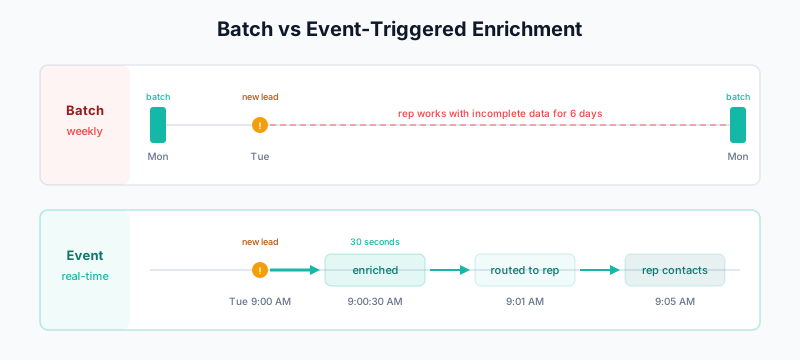
Batch vs Event-Triggered
Batch Enrichment:
─────────────────────────────────────────
Monday: 5,000 leads enriched overnight
Tuesday: New lead arrives at 9 AM
         → Waits until next batch (Monday)
         → 6 days before enrichment
         → Rep works with incomplete data all week

Event-Triggered:
─────────────────────────────────────────
Tuesday: New lead arrives at 9 AM
         → Enrichment triggered immediately
         → Data available in 30 seconds
         → Rep has full context instantly
Benefits
- Faster speed-to-lead — Enriched data available for immediate routing
- Better lead scoring — Score based on complete firmographics
- Personalized response — Reps see context before first touch
- Reduced data decay — Enrich when data is most current
Common Trigger Events
Lead Creation
The most common trigger:
Event: Lead created
Source: Form submission, list import, API creation

Enrichment:
- Contact info (email verification, phone)
- Company data (size, industry, tech stack)
- Social profiles (LinkedIn, Twitter)

Use Case:
- Lead routing
- Lead scoring
- Initial personalization
Contact Association
When a contact is linked to an account:
Event: Contact associated to Account
Source: Manual association, sync, automation

Enrichment:
- Account-level data (if not already enriched)
- Additional contacts at account
- Relationship mapping

Use Case:
- Account-based selling
- Multi-threaded outreach
- Org chart building
Opportunity Stage Change
When a deal progresses:
Event: Opportunity moves to "Negotiation"
Source: Rep updates stage

Enrichment:
- Executive contacts (decision makers)
- Financial data (for deal sizing)
- Competitor intelligence
- Recent news (negotiation leverage)

Use Case:
- Executive outreach
- Deal strategy
- Objection handling
Website Visit (Known Visitor)
When an identified visitor returns:
Event: Known contact visits pricing page
Source: Website analytics + CRM match

Enrichment:
- Refresh contact data (still at company?)
- Company growth indicators
- Intent signals

Use Case:
- Re-engagement timing
- Updated context for outreach
Intent Signal Detection
When buying signals appear:
Event: Account shows high intent on relevant topic
Source: Bombora, G2, LinkedIn, etc.

Enrichment:
- Find contacts at account
- Enrich contact details
- Research company context

Use Case:
- Proactive outreach
- ABM targeting
- Timely engagement
Data Quality Trigger
When data quality drops:
Event: Email bounces or phone disconnects
Source: Email platform, dialer

Enrichment:
- Find new email/phone
- Check if person changed jobs
- Update company association

Use Case:
- Data maintenance
- Job change detection
- Prevent further bounces
Architecture Patterns
Pattern 1: Direct Integration
Simplest approach—CRM triggers enrichment directly:
┌──────────┐     Webhook      ┌───────────────┐
│  CRM     │ ───────────────→ │  Enrichment   │
│          │                  │  Service      │
│          │ ←─────────────── │  (Clay, etc.) │
└──────────┘     API Push     └───────────────┘
Pros:
- Simple to implement
- Low latency
- Easy to debug
Cons:
- Tight coupling
- Limited transformation
- CRM-specific logic
Pattern 2: Event Bus
More scalable—events flow through a message queue:
┌──────────┐     Event      ┌───────────────┐     Event     ┌───────────────┐
│  CRM     │ ─────────────→ │  Event Bus    │ ────────────→ │  Enrichment   │
│          │                │  (Kafka, SQS) │               │  Service      │
│          │ ←───────────── │               │ ←──────────── │               │
└──────────┘    Update      └───────────────┘    Result     └───────────────┘
Pros:
- Decoupled systems
- Reliable delivery
- Easy to add consumers
Cons:
- More complex setup
- Slight latency increase
- Additional infrastructure
Pattern 3: Orchestration Layer
Complex workflows through dedicated orchestrator:
┌──────────┐     ┌────────────────────────────────────────────┐
│  CRM     │     │              Orchestrator                  │
│          │ ──→ │  ┌─────────┐  ┌─────────┐  ┌─────────┐   │
│          │     │  │Enrich 1 │→ │Enrich 2 │→ │Enrich 3 │   │
│          │ ←── │  └─────────┘  └─────────┘  └─────────┘   │
└──────────┘     └────────────────────────────────────────────┘
                              (Clay, n8n, Temporal)
Pros:
- Complex workflow support
- Retry and error handling
- Visibility and monitoring
Cons:
- Most complex setup
- Requires orchestration tool
- Higher cost
Salesforce Implementation
Flow-Based Triggers
Flow: Event-Triggered Lead Enrichment
Type: Record-Triggered Flow
Object: Lead
Trigger: After Insert

Entry Conditions:
- Email is not blank
- Enrichment_Status__c is blank or null

Steps:

1. Update Records (immediate)
   Enrichment_Status__c = "Pending"

2. Action: HTTP Callout
   Endpoint: [Clay webhook URL]
   Method: POST
   Headers: Content-Type: application/json
   Body:
   {
     "lead_id": "{!$Record.Id}",
     "email": "{!$Record.Email}",
     "company": "{!$Record.Company}",
     "event_type": "lead_created",
     "timestamp": "{!$Flow.CurrentDateTime}"
   }
Platform Event Approach
For more complex scenarios, use Platform Events:
// Publish event when Lead is created
trigger LeadTrigger on Lead (after insert) {
    List<Enrichment_Request__e> events = new List<Enrichment_Request__e>();

    for (Lead l : Trigger.new) {
        if (String.isNotBlank(l.Email)) {
            events.add(new Enrichment_Request__e(
                Record_Id__c = l.Id,
                Object_Type__c = 'Lead',
                Email__c = l.Email,
                Company__c = l.Company,
                Event_Type__c = 'created'
            ));
        }
    }

    if (!events.isEmpty()) {
        EventBus.publish(events);
    }
}
Subscribe externally via CometD or Pub/Sub API.
Change Data Capture
Use Salesforce CDC for external systems:
1. Enable CDC on Lead object
2. Subscribe to /data/LeadChangeEvent
3. External service receives all creates/updates
4. Filter for enrichment-worthy events
5. Trigger enrichment
HubSpot Implementation
Workflow-Based Triggers
Workflow: Event-Triggered Enrichment
Type: Contact-based

Enrollment Trigger:
- Contact is created
- AND Email is known
- AND Enrichment Status is not "Complete"

Actions:

1. Set property value
   Enrichment Status = "Pending"

2. Trigger webhook
   URL: [Clay webhook URL]
   Method: POST
   Body:
   {
     "contact_id": "{{contact.vid}}",
     "email": "{{contact.email}}",
     "company": "{{contact.company}}",
     "event_type": "contact_created"
   }

3. Delay: 60 seconds (wait for enrichment)

4. Branch: If Enrichment Status = "Complete"
   Yes → Continue workflow
   No → Send internal notification
Operations Hub Custom Code
For complex logic:
// Custom code action in Operations Hub
exports.main = async (event, callback) => {
  const axios = require('axios');

  const contactEmail = event.inputFields['email'];
  const contactId = event.inputFields['hs_object_id'];

  // Only enrich business emails
  const personalDomains = ['gmail.com', 'yahoo.com', 'hotmail.com'];
  const domain = contactEmail.split('@')[1];

  if (personalDomains.includes(domain)) {
    callback({
      outputFields: {
        should_enrich: 'false',
        reason: 'personal_email'
      }
    });
    return;
  }

  // Trigger enrichment
  try {
    await axios.post('https://your-enrichment-endpoint.com/enrich', {
      email: contactEmail,
      contact_id: contactId
    });

    callback({
      outputFields: {
        should_enrich: 'true',
        enrichment_triggered: 'true'
      }
    });
  } catch (error) {
    callback({
      outputFields: {
        should_enrich: 'true',
        enrichment_triggered: 'false',
        error: error.message
      }
    });
  }
};
Enrichment Service Design
Clay Webhook Handler
Clay can receive webhooks and trigger enrichments:
Clay Table Setup:

1. Create incoming webhook
   URL: https://api.clay.com/webhooks/[table-id]

2. Configure input columns:
   - email (from webhook payload)
   - company_domain (from webhook payload)
   - source_id (Salesforce/HubSpot ID)
   - event_type

3. Add enrichment columns:
   - [Your waterfall setup]

4. Add push action:
   - Push to Salesforce/HubSpot
   - Include source_id for matching
Custom Enrichment Service
If building your own:
// Express.js enrichment service
const express = require('express');
const app = express();

app.post('/enrich', async (req, res) => {
  const { email, company, source_id, source_system } = req.body;

  // 1. Check cache (avoid re-enriching recent data)
  const cached = await cache.get(email);
  if (cached && cached.age < 24 * 60 * 60 * 1000) {
    await pushToCRM(source_system, source_id, cached.data);
    return res.json({ status: 'cached', data: cached.data });
  }

  // 2. Waterfall enrichment
  let enrichedData = {};

  // Try Apollo first
  const apolloData = await enrichWithApollo(email);
  if (apolloData) {
    enrichedData = { ...enrichedData, ...apolloData };
  }

  // Fill gaps with Clearbit
  if (!enrichedData.title || !enrichedData.phone) {
    const clearbitData = await enrichWithClearbit(email);
    enrichedData = { ...enrichedData, ...clearbitData };
  }

  // Verify email
  enrichedData.email_valid = await verifyEmail(email);

  // 3. Cache result
  await cache.set(email, { data: enrichedData, timestamp: Date.now() });

  // 4. Push back to CRM
  await pushToCRM(source_system, source_id, enrichedData);

  res.json({ status: 'enriched', data: enrichedData });
});

async function pushToCRM(system, id, data) {
  if (system === 'salesforce') {
    await salesforce.update('Lead', id, mapToSalesforceFields(data));
  } else if (system === 'hubspot') {
    await hubspot.updateContact(id, mapToHubSpotProperties(data));
  }
}
Timing Considerations
Latency Requirements
Lead Routing Scenario:
─────────────────────────────────────────
Requirement: Route lead to correct rep
Enrichment needed: Company size, industry
Acceptable latency: <5 seconds

Why: Round-robin vs enterprise rep routing
     must happen before notification

Solution:
- Use fastest enrichment provider
- Cache company data
- Parallel enrichment calls
Sales Outreach Scenario:
─────────────────────────────────────────
Requirement: Enrich before rep calls
Enrichment needed: Full profile, research
Acceptable latency: <60 seconds
Why: Rep won't call for several minutes
anyway
Solution:
- Full waterfall enrichment
- Include AI-generated research
- No need to optimize for speedAsync vs Sync
Synchronous (wait for result):
Good for:
- Lead routing that depends on enrichment
- Real-time lead scoring
- Immediate personalization

Challenge:
- User waits for response
- Timeout risk
- Must be fast (<5s)
Asynchronous (fire and forget):
Good for:
- Background data enhancement
- Deep research
- Non-blocking workflows

Challenge:
- Need callback mechanism
- More complex error handling
- State management
Recommended Approach
Event Type              | Sync/Async | Latency Target
─────────────────────────────────────────────────────
Lead creation (routing) | Sync       | <3 seconds
Lead creation (full)    | Async      | <60 seconds
Opportunity advance     | Async      | <2 minutes
Intent signal           | Async      | <5 minutes
Data quality trigger    | Async      | <1 hour
Error Handling
Retry Logic
async function enrichWithRetry(email, maxRetries = 3) {
  for (let attempt = 1; attempt <= maxRetries; attempt++) {
    try {
      const result = await enrich(email);
      return result;
    } catch (error) {
      if (attempt === maxRetries) {
        // Final failure - log and alert
        await logFailure(email, error);
        await alertOps(email, error);
        throw error;
      }

      // Exponential backoff
      const delay = Math.pow(2, attempt) * 1000;
      await sleep(delay);
    }
  }
}
Dead Letter Queue
For failed enrichments:
Workflow:
1. Enrichment fails after all retries
2. Record added to "Failed Enrichment" queue
3. Daily job processes queue:
   - Retry with different provider
   - Manual review if still fails
4. Alert if queue grows too large
Partial Success Handling
Scenario: Apollo returns title, but no phone

Options:
1. Partial update (update what we got)
2. Wait and retry (try another provider)
3. Queue for follow-up (get phone later)

Recommendation:
- Always do partial update
- Mark which fields still need data
- Background job fills gaps later
Monitoring
Key Metrics
Event-Triggered Enrichment Dashboard:

Volume:
- Events received: X/hour
- Enrichments triggered: Y/hour
- Success rate: Z%

Latency:
- P50 latency: Xms
- P95 latency: Yms
- P99 latency: Zms

Quality:
- Fields populated: X%
- Enrichment coverage: Y%
- Error rate: Z%
Alerting
Alert Conditions:

1. High error rate
   If error_rate > 5% for 15 minutes
   → Page on-call

2. High latency
   If P95_latency > 10 seconds
   → Slack notification

3. Queue backup
   If dead_letter_queue_size > 100
   → Slack notification

4. Provider down
   If provider_success_rate < 90%
   → Switch to backup provider
Related Guides
- Clay + CRM Integration Patterns — Integration architectures
- Waterfall Enrichment — Multi-source enrichment
- Modern Outbound Data Stack — System architecture
- Salesforce Data Quality Scorecard — Measuring impact
- The B2B Data Decay Problem — Why real-time matters