Clay + CRM Integration Patterns: Salesforce and HubSpot Workflows
Advanced integration patterns for Clay with Salesforce and HubSpot. Learn bi-directional sync, enrichment triggers, and automation workflows.
Clay becomes much more powerful when integrated with your CRM. Instead of manual list building, you can automate enrichment workflows that keep your Salesforce or HubSpot data continuously fresh.
This guide covers the most effective integration patterns.
Integration Options
Native Integrations
Clay offers direct integrations with:
- Salesforce — Bi-directional sync
- HubSpot — Bi-directional sync
Webhook-Based
For custom workflows:
- Trigger Clay from CRM events
- Push Clay results to any system
- Chain multiple tools together
Zapier/Make
For no-code integration:
- Connect Clay tables to 5000+ apps
- Schedule automated runs
- Handle complex branching logic
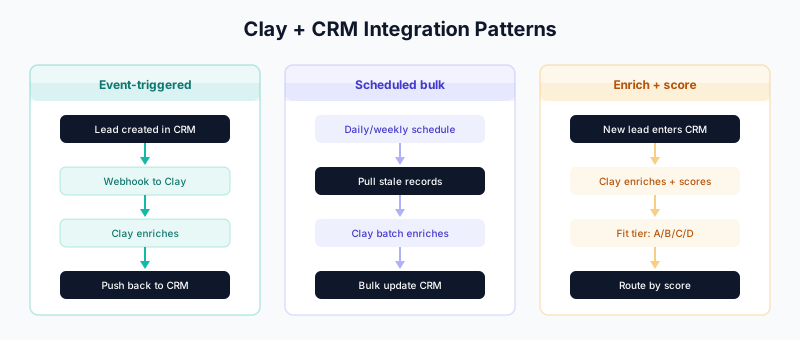
Pattern 1: CRM-Triggered Enrichment
Concept
When a record is created or updated in your CRM, automatically enrich it through Clay.
CRM Record Created
       ↓
   Webhook fires
       ↓
   Clay enriches
       ↓
   Results push back to CRM
Salesforce Implementation
Step 1: Create Clay Table
Set up a Clay table with:
- Input columns: Email, Company Domain, Salesforce ID
- Enrichment columns: Your waterfall setup
- Output columns: Mapped to Salesforce fields
Step 2: Salesforce Flow
Flow: Trigger Clay Enrichment

Trigger: Lead is created
         OR Contact is created
         AND Email is not blank

Actions:
1. HTTP Callout (Clay Webhook)
   Endpoint: https://api.clay.com/v1/webhooks/[your-webhook]
   Method: POST
   Body:
   {
     "email": "{!$Record.Email}",
     "company_domain": "{!$Record.Company}",
     "salesforce_id": "{!$Record.Id}",
     "object_type": "Lead"
   }

2. Update Record
   Enrichment_Status__c = "Pending"
Step 3: Clay Webhook Setup
- In Clay, go to Integrations → Incoming Webhooks
- Create new webhook
- Copy the webhook URL
- Configure which columns receive webhook data
Step 4: Push Back to Salesforce
In Clay, add Salesforce integration:
- Add Push to Salesforce action
- Map enriched fields to Salesforce fields
- Configure update vs create behavior
HubSpot Implementation
Step 1: Create Clay Table
Same structure as Salesforce, but with HubSpot ID instead.
Step 2: HubSpot Workflow
Workflow: Trigger Clay Enrichment

Trigger: Contact is created
         AND Email is known

Actions:
1. Webhook
   URL: https://api.clay.com/v1/webhooks/[your-webhook]
   Method: POST
   Body:
   {
     "email": "{{contact.email}}",
     "company_domain": "{{company.domain}}",
     "hubspot_id": "{{contact.vid}}"
   }

2. Set property
   Enrichment Status = "Pending"
Step 3: Push Back to HubSpot
In Clay:
- Add Push to HubSpot action
- Map fields
- Set update behavior
Pattern 2: Scheduled Bulk Enrichment
Concept
Periodically pull records from CRM, enrich them, and push back updates.
Schedule triggers (daily/weekly)
          ↓
   Pull from CRM (stale records)
          ↓
   Clay enriches batch
          ↓
   Push updates back to CRM
Implementation
Step 1: Pull Records from Salesforce
In Clay, create a table with Salesforce source:
Source: Salesforce
Object: Contact
Query: SELECT Id, Email, Name, Title, Phone,
              Account.Name, Account.Website,
              Last_Enriched__c
       FROM Contact
       WHERE Last_Enriched__c < LAST_N_DAYS:90
       OR Last_Enriched__c = null
       LIMIT 1000
Step 2: Add Enrichment Columns
Build your waterfall enrichment:
- Apollo for initial pass
- Clearbit/Breeze for company data
- Cognism for phone numbers
- Email verification
Step 3: Push Updates
Configure Salesforce push:
Field Mapping:
  Clay Column           → Salesforce Field
  enriched_title        → Title
  enriched_phone        → Phone
  enriched_linkedin     → LinkedIn_URL__c
  confidence_score      → Data_Confidence__c
  TODAY()               → Last_Enriched__c
Step 4: Schedule
- In Clay, go to table settings
- Enable Scheduled runs
- Set frequency (daily at 2 AM recommended)
HubSpot Version
Source: HubSpot
Filter: Last Enrichment Date is more than 90 days ago
        OR Last Enrichment Date is unknown
Limit: 1000 contacts

Push:
  Update existing contacts by email
  Map enriched fields to HubSpot properties
Pattern 3: Lead Scoring Enrichment
Concept
Use Clay to gather data for lead scoring, not just contact info.
New Lead enters CRM
        ↓
  Clay enriches with:
  - Firmographics
  - Technographics
  - Intent signals
  - Social presence
        ↓
  Calculate fit score
        ↓
  Push score to CRM
        ↓
  CRM routes based on score
Implementation
Clay Table Setup:
Input Columns:
- email
- company_domain
- salesforce_id

Enrichment Columns:
- Company Size (from Apollo)
- Industry (from Clearbit)
- Funding (from Crunchbase)
- Technologies Used (from BuiltWith)
- LinkedIn Followers (from LinkedIn)
- Job Postings Count (from job boards)

Scoring Formula Column:
IF(company_size > 100, 20, IF(company_size > 50, 10, 0)) +
IF(industry IN ("Technology", "SaaS"), 15, 0) +
IF(funding > 10000000, 15, 0) +
IF(technologies CONTAINS "Salesforce", 10, 0) +
IF(linkedin_followers > 1000, 10, 0) +
IF(job_postings > 5, 10, 0)

Max Score: 80 points

Output:
- lead_score
- score_breakdown
- fit_tier (A/B/C/D)
CRM Integration:
Push to Salesforce:
Lead_Score__c = lead_score
Score_Breakdown__c = score_breakdown
Fit_Tier__c = fit_tier
Then in Salesforce, create routing rules based on Fit_Tier__c.
Pattern 4: Account Research Automation
Concept
Automatically research target accounts before sales outreach.
Account added to target list
           ↓
    Clay researches:
    - Company overview
    - Key contacts
    - Recent news
    - Tech stack
    - Competitors
           ↓
    Research brief generated
           ↓
    Pushed to CRM Account record
Implementation
Trigger: Account added to Salesforce Campaign or specific list
Clay Research Workflow:
Input: Account Domain

Enrichments:
1. Company Profile (Clearbit)
   → Size, industry, funding, description

2. Key Contacts (Apollo)
   → Find 5-10 relevant titles
   → VP Sales, CRO, Director Sales Ops

3. Recent News (Clay AI Web Search)
   → Search: "{company name} news"
   → Summarize top 3 stories

4. Tech Stack (BuiltWith)
   → Current tools in our category
   → Competitor products used

5. AI Summary (Claude/GPT)
   Prompt: "Create a one-paragraph research brief
           for a sales rep calling on {company}.
           Include: company overview, recent news,
           potential pain points based on their tech stack."

Output:
- research_brief (text)
- key_contacts (JSON)
- tech_stack (list)
- news_summary (text)
Push to Salesforce:
Account.Research_Brief__c = research_brief
Account.Key_Contacts__c = key_contacts
Account.Tech_Stack__c = tech_stack
Account.Last_Researched__c = TODAY()
Pattern 5: Continuous Data Hygiene
Concept
Automatically detect and flag records needing attention.
Weekly scan of CRM
        ↓
  Clay checks:
  - Email validity
  - Job changes
  - Company changes
        ↓
  Flag records with issues
        ↓
  Create tasks in CRM for review
Implementation
Clay Table:
Source: Salesforce Contacts (all or segment)

Validation Columns:

1. Email Verification (NeverBounce/ZeroBounce)
   → Returns: valid, invalid, catch-all, unknown

2. Job Title Check (Apollo/LinkedIn)
   → Compare current vs CRM title
   → Flag if different

3. Company Check (Clearbit)
   → Is person still at this company?
   → Flag if company changed

4. Phone Verification (if available)
   → Is number still connected?

Output Columns:
- needs_review (boolean)
- review_reason (text)
- suggested_updates (JSON)
Push Back to Salesforce:
If needs_review = true:
  1. Set Contact.Data_Status__c = "Needs Review"
  2. Create Task:
     Subject: "Data review needed: {review_reason}"
     Due Date: +7 days
     Assigned: Contact Owner

If email = invalid:
  1. Set Contact.Email_Status__c = "Invalid"
  2. Add to "Invalid Emails" list
Pattern 6: Intent-Based Enrichment
Concept
When intent signals are detected, immediately enrich the account.
Intent signal detected (Bombora, G2, etc.)
              ↓
    Account identified
              ↓
    Clay enriches contacts at account
              ↓
    Contacts pushed to CRM
              ↓
    Sales alerted
Implementation
Step 1: Intent Source
Connect intent provider to Clay:
- Bombora intent feed
- G2 buyer intent
- LinkedIn engagement
- Website visitor identification
Step 2: Clay Workflow
Trigger: New intent signal received

Input:
- company_domain
- intent_topics
- intent_score

Enrichments:
1. Find buying committee (Apollo)
   Titles: VP Sales, CRO, Sales Ops Director, CFO

2. Enrich each contact
   → Email, phone, LinkedIn

3. Score relevance
   → Based on title match to your ICP

Output:
- Contacts with full profiles
- Account summary
- Intent context
Step 3: Push to CRM
For each contact:
1. Create or update in Salesforce
2. Associate to Account
3. Set Intent_Source__c = "Bombora"
4. Set Intent_Topics__c = topics
5. Set Intent_Score__c = score

For Account:
1. Update Intent_Status__c = "Active"
2. Create Task: "High intent detected"
Error Handling
Webhook Failures
Clay Webhook Error Handling:

1. Implement retry logic
   - 3 retries with exponential backoff
   - Log all failures

2. Dead letter queue
   - Store failed records
   - Manual review process

3. Alerts
   - Notify ops team on X failures
   - Daily failure summary
Sync Conflicts
When CRM and Clay have different data:

Option 1: CRM wins (conservative)
- Never overwrite manually-entered data
- Only fill empty fields

Option 2: Clay wins (aggressive)
- Assume enriched data is more current
- Overwrite stale fields

Option 3: Timestamp-based
- Compare last modified dates
- Keep most recent value

Recommendation: Use a "confidence" field
- High confidence Clay data overwrites
- Low confidence only fills blanks
Rate Limits
Salesforce: 100,000 API calls/24 hours (varies by edition)
HubSpot: 100 requests/10 seconds (varies by tier)

Mitigation:
- Batch updates (up to 200 records per call)
- Schedule during off-hours
- Monitor usage dashboards
- Implement request throttling
Monitoring and Optimization
Key Metrics
Integration Health Dashboard:

Sync Success Rate:
  - Records sent to CRM: X
  - Successfully updated: Y
  - Failed: Z
  - Success rate: Y/X %

Enrichment Coverage:
  - Records processed: A
  - Records enriched: B
  - Coverage rate: B/A %

Data Quality Impact:
  - Completeness before: C%
  - Completeness after: D%
  - Improvement: D-C %

Cost Efficiency:
  - Clay credits used: E
  - Records enriched: F
  - Cost per enrichment: $/F
Optimization Tips
- Filter aggressively — Don’t enrich records you don’t need
- Use conditional enrichment — Skip if data already exists
- Batch appropriately — Balance latency vs efficiency
- Monitor coverage — Track which providers return data
- A/B test workflows — Compare different enrichment orders
Related Guides
- Clay 101 — Getting started with Clay
- Waterfall Enrichment — Multi-source enrichment setup
- Salesforce Duplicate Rules — Prevent enrichment duplicates
- HubSpot Duplicate Management — HubSpot deduplication
- Modern Outbound Data Stack — Architecture overview